AI tools for small businesses are software applications that use artificial intelligence to automate tasks, create content, analyse information, communicate with customers, generate leads, and improve business productivity. In 2026, these tools have become accessible to businesses of every size, not just large enterprises with dedicated technology teams. Small business owners are adopting AI because it directly addresses their biggest constraints: limited time, limited budget, and the need to compete with larger competitors who have more staff and resources.
This guide covers the most practical AI tools across every major business function, from writing and design to customer support and automation. It explains what each tool does, who it suits, what it costs, and where its limitations lie. By the end, you will understand which categories of AI tools matter most for your business and how to start using them without wasting money on software you do not need.
Quick Answer: What Are the Best AI Tools for Small Businesses in 2026?
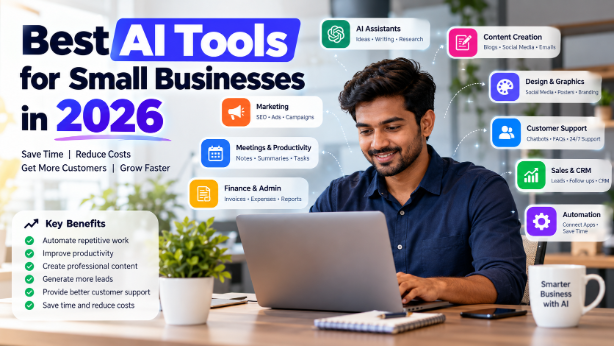
There is no single best AI tool for every small business. The right choice depends on your business size, budget, workflow, and specific requirements. That said, the most useful categories of AI tools in 2026 are:
AI general assistants like ChatGPT, Claude, and Google Gemini for writing, research, and everyday tasks. AI writing and content tools like Jasper, Grammarly, and Copy.ai for marketing content. AI design tools like Canva and Adobe Express for graphics and marketing materials. AI meeting and productivity tools like Otter, Fireflies, and Notion AI for notes and documentation. AI marketing tools for SEO, email campaigns, and social media. AI customer support tools like Tidio and Haptik for chatbots and FAQ automation. AI sales and CRM tools like HubSpot for lead scoring and follow-ups. AI automation platforms like Zapier and Make for connecting different business applications. AI finance tools like QuickBooks and Sage for bookkeeping and expense tracking. AI coding tools for website development and technical work.
Most small businesses should start with one or two tools that address their most time-consuming problems, prove the value, and then expand from there.
AI General Assistants
General AI assistants are the most versatile entry point for small businesses. They handle writing, research, brainstorming, summarising, and basic analysis through natural conversation.
ChatGPT remains the most widely adopted general assistant. It is best for drafting emails, creating product descriptions, brainstorming marketing ideas, answering customer questions, and generating content across many formats . Its strength is breadth: it can switch between tasks without requiring specialised setup. The free tier is capable for light use, while paid plans add faster responses, newer models, and higher usage limits. The limitation is that it can produce plausible-sounding but incorrect information, so important outputs need verification.
Claude is particularly strong for long-document analysis, structured writing, and tasks that require careful reasoning. Small businesses use it to summarise contracts, analyse reports, and produce polished business writing . It tends to handle nuance well and is often preferred for strategic thinking tasks. Like ChatGPT, it requires human review for factual accuracy.
Google Gemini integrates with Google Workspace tools, which makes it convenient for businesses already using Gmail, Google Docs, and Sheets. It is useful for research, organising information, and turning ideas into structured plans . Its advantage is workflow integration rather than raw capability differences.
Microsoft Copilot brings AI directly into Microsoft 365 applications. In Outlook, it summarises email threads and drafts replies. In Word, it helps write and edit documents. In Excel, it analyses data and generates insights. In Teams, it transcribes meetings and creates summaries . For businesses already paying for Microsoft 365, Copilot adds AI capability without introducing another platform. The limitation is that it works best within the Microsoft ecosystem and may require administrator activation .
AI Writing and Content Creation
Content creation consumes significant time for most small businesses. AI writing tools reduce that burden, though they work best as drafting assistants rather than replacements for human judgment.
Jasper is built specifically for marketing content. It helps create blog posts, email campaigns, ad copy, landing pages, and social media content while maintaining brand voice . It is more focused than general assistants, which makes it efficient for teams producing regular marketing content. The limitation is that it requires brand guidelines and editorial oversight to avoid generic output.
Grammarly focuses on editing and writing improvement rather than generation. It checks grammar, suggests clarity improvements, and adjusts tone. For businesses where written communication quality matters — proposals, client emails, reports — it provides consistent value . It works across many applications through browser extensions and desktop apps.
Copy.ai specialises in short-form marketing content: product descriptions, social captions, email subject lines, and ad variations. It is useful for e-commerce businesses that need to generate many product descriptions efficiently.
For most small businesses, a general assistant like ChatGPT or Claude handles the majority of content writing needs. Specialised tools become worthwhile when you produce content at volume or need consistent brand voice across many pieces.
AI Design and Visual Content
Professional-looking visual content is essential for marketing, but not every small business can afford a designer. AI design tools have narrowed that gap considerably.
Canva is the most accessible option. It offers thousands of templates for social media posts, presentations, flyers, posters, and business cards, with AI features for image generation, background removal, and design suggestions . The free tier covers most small business needs, while paid plans add more templates, brand kits, and AI credits. It is suitable for businesses without design expertise that need to produce marketing materials regularly.
Adobe Express provides similar functionality with a focus on non-designers. It offers templates for flyers, brochures, menus, and social posts, with AI tools for generating custom graphics and editing images . The free tier includes limited AI credits. It is a good option for businesses already using other Adobe products or needing slightly more design flexibility than Canva offers.
Adobe Firefly is a generative AI tool for creating original images from text prompts. It is useful for creating custom visuals that are not based on existing templates. The limitation is that AI-generated images require review for brand appropriateness and may need refinement.
For most small businesses, Canva’s free tier provides sufficient capability to maintain a professional visual presence without hiring a designer .
AI Meeting and Productivity Tools
Meetings consume time and produce action items that are often lost. AI meeting tools capture, transcribe, and summarise conversations, turning discussions into searchable records and follow-up tasks.
Otter joins meetings, records conversations, generates transcriptions, and produces summaries with action items . It can attend meetings on your behalf when you cannot be present. The free tier includes limited transcription minutes per month, while paid plans add more minutes and features.
Fireflies offers similar functionality with a focus on team collaboration. It transcribes meetings, extracts action items, and integrates with CRM and project management tools . It is suited for teams that need shared access to meeting notes.
Notion AI works differently. Rather than just recording meetings, it helps document processes, create standard operating procedures, and organise business knowledge . It is useful for businesses that want to capture institutional knowledge and reduce the time spent explaining processes repeatedly.
Microsoft Copilot includes meeting transcription and summarisation within Teams, making it convenient for organisations already using Microsoft 365 .
AI Marketing Tools
Marketing is one of the highest-value applications of AI for small businesses because it directly affects lead generation and revenue. AI marketing tools help with research, content planning, campaign execution, and performance analysis.
For SEO research, tools like Perplexity provide source-backed answers for market research, competitor analysis, and industry trends . Unlike traditional search, it delivers synthesised answers rather than lists of links.
For email marketing, platforms like MailerLite include AI features for newsletter creation, landing pages, and lead nurturing automation . HubSpot’s marketing tools use AI to predict when to send emails and which leads are most likely to convert .
For social media, Metricool and similar tools schedule posts, track analytics, and manage multiple platforms from one place . Canva handles the visual side of social content.
For customer segmentation, AI tools can analyse customer data to identify patterns and group customers by behaviour, value, or likelihood to purchase. This capability was once limited to large enterprises but is now accessible through platforms like HubSpot and Zoho .
The key limitation of AI marketing tools is that they require clean data and clear objectives. AI can execute campaigns efficiently, but strategy still requires human judgment about target audience, positioning, and brand voice.
AI Customer Support and Chatbots
Customer support is a function where AI can provide immediate, measurable value. AI chatbots handle common questions, qualify leads, and provide 24/7 availability without requiring staff to be online at all hours.
Tidio offers an AI agent called Lyro that answers customer questions using a business’s own knowledge base, transfers conversations to human agents when needed, and connects with CRM and support systems . The first 50 AI conversations are free, with paid plans starting at around $32.50/month for 50 monthly conversations . It is suited for small support teams that want focused automation without an enterprise platform.
Haptik, developed by Jio Platforms, is particularly relevant for Indian businesses. It powers customer interactions for banks, e-commerce firms, and healthcare startups, and now serves SMBs through WhatsApp and voice-based AI tools for support, lead generation, and appointment booking . It supports 22 Indian languages and offers base plans covering 2,000 AI-powered conversations .
Jio Haptik SOLO is a newer platform designed specifically for Indian solopreneurs and small businesses. It features two AI teammates — Tara for marketing and Ved for sales and customer support — that work autonomously within limits set by the business owner . It includes a free plan, with premium subscriptions starting at ₹2,000 per month .
Gupshup allows businesses to build intelligent bots across WhatsApp, SMS, and over 30 other channels. Its Auto Bot Builder creates a chatbot from any website using AI, enabling deployment within minutes .
The most important limitation of AI customer support is that complex, emotional, or high-stakes issues still require human handling. Businesses should design clear escalation paths so customers can reach a person when automation is not appropriate.
AI Sales and CRM Tools
AI sales tools help businesses identify which leads to prioritise, automate follow-ups, and forecast revenue more accurately.
HubSpot CRM is a free platform that includes AI features for customer outreach, lead scoring, and follow-up reminders . Its Breeze assistant drafts personalised emails, assigns lead scores, and schedules follow-ups automatically . HubSpot also launched a deep research connector with ChatGPT that lets businesses analyse their CRM data using natural language queries and take action on the insights .
QuickBooks Online includes AI-driven features for financial management that support sales processes, including automated invoicing, payment reminders, and cash flow visibility .
Zoho CRM includes Zia, an AI assistant that analyses CRM data, predicts sales trends, and provides recommendations for follow-up actions .
For Indian small businesses, CRM automation through AI can significantly reduce the manual effort involved in tracking leads, sending follow-ups, and maintaining customer records. Tools like HubSpot and Zoho offer free tiers that make CRM accessible even for businesses just starting with structured sales processes.
AI Automation Tools
AI automation platforms connect different business applications and trigger actions when specific events occur. They eliminate the manual work of moving data between systems and ensure that follow-up tasks happen consistently.
Zapier is the most widely used automation platform for small businesses. It connects thousands of apps and allows you to create workflows without coding . A typical workflow might be: website enquiry → CRM entry → Slack notification → email follow-up → task creation. Zapier’s AI-powered creation tool lets you describe the workflow in plain language and generates the automation . The free tier has limited task runs, while paid plans start at higher limits.
Make (formerly Integromat) offers similar functionality with a visual builder that some users find more powerful for complex workflows . It is suited for businesses that need conditional logic and multi-step automations.
n8n is an open-source alternative that provides more control and can be self-hosted, which appeals to businesses with specific data privacy requirements. It requires more technical setup than Zapier or Make.
The practical value of automation is that it turns one-time setup into ongoing time savings. A workflow that automatically captures leads, updates the CRM, and sends a follow-up email saves minutes per lead, which compounds across hundreds of leads over time.
A realistic small business automation: A form submission on your website triggers a Zapier workflow that adds the contact to HubSpot, assigns a lead score, sends a personalised email via Gmail, creates a task in Notion for follow-up, and posts a notification in Slack. This entire sequence runs without manual intervention.
AI Finance and Business Administration
AI is increasingly capable in finance and administrative tasks, though it requires careful oversight for anything involving tax, compliance, or significant financial decisions.
QuickBooks Online uses AI for bookkeeping, expense categorisation, invoice tracking, and cash flow forecasting . Its Intuit Assist features automatically categorise transactions, reconcile books, and detect anomalies . For small businesses without a full-time accountant, this reduces the time spent on financial administration significantly.
Sage offers similar AI capabilities, including scanning receipts and invoices to extract information and add it to ledgers, tracking invoices, reconciling payments, and spotting errors . It also generates financial reports and automates bookkeeping workflows.
Hubdoc extracts transaction details from photos of receipts and invoices, eliminating manual data entry . It integrates with accounting software to streamline the bookkeeping process.
It is important to state clearly: AI-generated financial information should always be reviewed before making important financial or tax decisions. AI can categorise expenses and flag anomalies, but it does not understand your specific tax situation, legal structure, or financial strategy. Use AI to reduce administrative burden, not to replace professional financial advice.
AI Coding and Website Development Tools
AI coding assistants help small businesses and agencies build websites, debug code, and create prototypes faster. This category is more technical than others, but even non-technical business owners can use AI tools to generate basic website content, product descriptions, and landing pages.
For businesses building or maintaining their own websites, AI coding assistants can generate code from natural language descriptions, suggest fixes for errors, explain what existing code does, and automate repetitive development tasks. These tools are particularly valuable for agencies that build websites for clients and need to move faster without expanding their development team.
Meta Muse has expanded to small businesses with integrations that include Shopify, QuickBooks, Stripe, Slack, Canva, Asana, Notion, and Zoom . It functions as an AI agent that can complete tasks across these platforms, analyse business performance, and work toward goals like finding new customers or developing a growth plan . Muse requires approval before it publishes content, sends messages, or spends money, giving business owners control over what the AI does on their behalf .
For small businesses that need website development but do not have in-house technical staff, AI coding tools reduce the cost and time involved in building and maintaining a web presence. However, complex projects still benefit from human oversight to ensure security, performance, and appropriate architecture.
Best AI Tool for Specific Small Business Needs
Best AI Tool for Content Creation
Businesses that produce regular marketing content — blogs, social posts, email campaigns — benefit most from AI writing tools. ChatGPT and Claude handle most content needs through natural conversation . Jasper adds structure for marketing teams that need brand voice consistency . Canva covers the visual side of content creation . The limitation is that AI-generated content requires human review for accuracy, brand appropriateness, and originality.
Best AI Tool for Small Business Marketing
HubSpot provides the most comprehensive AI marketing capabilities for small businesses, combining CRM data with automation, lead scoring, and email marketing . Perplexity supports market research and competitor analysis . Canva and Metricool handle visual content and social scheduling. The limitation is that marketing AI works best when you have clean data and clear target audience definitions.
Best AI Tool for Customer Support
Tidio and Haptik offer focused AI customer support for small businesses . Tidio’s Lyro handles knowledge-based questions and human handoff . Haptik supports WhatsApp and Indian languages, with plans designed for SMB budgets . The limitation is that complex customer issues still require human agents, and AI should be positioned as a first-response layer rather than a complete replacement.
Best AI Tool for Sales
HubSpot CRM provides free AI features for lead scoring, follow-up automation, and outreach drafting . Zoho CRM with Zia offers similar capabilities for businesses already using the Zoho ecosystem . The limitation is that AI sales tools depend on accurate CRM data, and poor data quality leads to poor AI recommendations.
Best AI Tool for Automation
Zapier and Make are the leading options for small business automation . Zapier is easier to start with, while Make offers more power for complex workflows. The limitation is that automation requires clearly defined processes. Automating a broken process just makes it fail faster.
Best AI Tool for Meetings
Otter, Fireflies, and Fathom provide meeting transcription, summarisation, and action item extraction . Fathom offers unlimited recordings and transcriptions on its free individual plan . The limitation is that meeting recording requires participant consent in many jurisdictions, and not every meeting benefits from transcription.
Best AI Tool for Design
Canva remains the most accessible design tool for non-designers, with a generous free tier and AI features for image generation and editing . Adobe Express provides an alternative for businesses needing slightly more design flexibility . The limitation is that AI design tools work best with templates and simple modifications. Complex original design still benefits from human creativity.
Best AI Tool for Small Business Websites
AI coding assistants and website builders help small businesses create and maintain web presences without extensive technical knowledge. Meta Muse can work across platforms like Shopify and Canva to support website-related tasks . For businesses using WordPress, AI plugins can add chatbot functionality and lead capture . The limitation is that AI-generated websites may lack the performance optimisation, security hardening, and SEO structure that experienced developers provide.
Best AI Tool for Freelancers
Freelancers benefit most from general assistants (ChatGPT, Claude), design tools (Canva), and meeting/productivity tools (Notion AI) . Perplexity supports research for client work . The limitation is that freelancers must be careful not to over-automate client-facing communication, which can feel impersonal.
Best AI Tool for Indian Small Businesses
Indian small businesses have access to global tools plus India-specific options. Haptik and Gupshup provide WhatsApp-based customer engagement with support for Indian languages . Jio Haptik SOLO offers AI teammates for marketing and sales starting at ₹2,000/month . Bhashini provides translation and speech tools across Indian languages, backed by the Government of India . The limitation is that tool availability, pricing, payment methods, and regional features can change. Verify current details on official provider websites before committing.
Best Free AI Tools for Small Businesses in 2026
Several capable AI tools offer free access, though the distinction between “completely free,” “free plan,” “free trial,” and “limited free usage” matters.
Completely free or free with generous limits: Perplexity provides source-backed research answers at no cost . CapCut offers video editing with AI features completely free . Bhashini provides language translation tools free through government backing .
Free plans with meaningful capability: ChatGPT, Claude, and Google Gemini all offer free tiers suitable for light use . Canva’s free tier includes templates, basic editing, and limited AI features . Notion AI offers free basic use . Tidio includes the first 50 AI conversations free for the lifetime of the account . Zapier’s free tier includes limited task runs . Meta Muse is free with usage limits . Jio Haptik SOLO includes a free plan .
Free trials: Most paid AI tools offer trials ranging from 7 to 30 days. These are useful for evaluation but should not be counted as ongoing free access.
The practical approach for a small business with zero AI budget: start with ChatGPT or Claude for writing and research, Canva for design, and a free CRM like HubSpot for customer tracking. This combination covers the most common small business needs at no cost.
Best AI Tools for Small Businesses in India
Indian small businesses have specific needs that differ from global averages: WhatsApp is a primary customer communication channel, local SEO matters for foot traffic, and bilingual content (Hindi/English) is often necessary.
WhatsApp customer communication: Haptik and Gupshup provide AI-powered WhatsApp chatbots for support, lead qualification, and order handling . Jio Haptik SOLO connects to WhatsApp and Instagram to manage customer conversations .
Lead generation and CRM: HubSpot and Zoho both offer free CRM tiers with AI features suitable for Indian businesses . Zoho is particularly relevant because it is an Indian company with pricing and support designed for local businesses.
Local SEO and Google Business Profile: AI tools can help generate content for Google Business Profile posts, respond to reviews, and optimise local search presence. General assistants like ChatGPT handle this well with appropriate prompts.
Hindi/English content: Bhashini provides translation and speech tools across Indian languages . General AI assistants can generate content in Hindi, English, or mixed Hinglish, though quality varies by language.
Customer support: Haptik supports 22 Indian languages and offers conversation costs between ₹3 and ₹5, with base plans covering 2,000 AI conversations for ₹10,000 . This pricing is designed for Indian SMB budgets.
Invoice and document workflows: QuickBooks and Sage both offer AI features for invoice processing and expense categorisation . For Indian businesses using Tally or similar software, AI tools can extract data from invoices and receipts to reduce manual entry.
E-commerce: Sellsmith is a WooCommerce AI chatbot that runs on a free Google Gemini API key, answers buyer questions in the buyer’s language, and hands off to WhatsApp with the order pre-written . It is designed for small stores that want AI sales support without monthly AI fees.
Marketing automation: Jio Haptik SOLO automates marketing campaigns, creates product visuals and videos, and manages advertising campaigns for Indian solopreneurs .
Tool availability, pricing, payment methods, and regional features can change. Verify current details on official provider websites, especially for pricing and language support.
How Much Do AI Tools Cost for a Small Business?
AI tool costs vary widely based on the number of tools, the number of users, and usage volume. The following budgets are illustrative examples, not universal pricing.
₹0/month
A business using primarily free AI tools can operate with zero software cost. This typically includes ChatGPT free tier or Claude free tier for writing, Canva free tier for design, HubSpot free CRM for customer tracking, and Perplexity for research . The limitation is usage caps and fewer features, but for a solo freelancer or very small business, this covers most needs.
₹1,000–₹3,000/month
A business using a small number of paid tools falls in this range. Examples: ChatGPT Plus or Claude Pro for a single user, Canva Pro for design, and one additional tool like Tidio for customer support or Grammarly for writing . This covers a business that has identified specific high-value use cases and wants higher limits and features.
₹5,000+/month
A business using multiple AI systems and automation typically spends in this range. Examples: multiple team seats on general assistants, HubSpot paid tier or Zoho CRM with AI, Tidio paid plan for customer support, Zapier paid plan for automation, and design tools . This level of investment makes sense for businesses handling significant lead volume, multiple customer channels, and complex workflows.
Additional costs to consider: API usage (for custom integrations), per-conversation pricing (for chatbots), per-user pricing (for team tools), and storage or processing fees (for document tools). Also account for overlapping subscriptions — many businesses pay for tools they do not fully use. Review subscriptions quarterly and cancel anything that is not delivering measurable value.
How Can Small Businesses Calculate the ROI of AI Tools?
The simplest formula: AI ROI = Value of time/cost saved − AI cost.
Example: A small business owner spends 10 hours per week writing content, answering customer emails, and creating social media posts. At ₹500/hour, that is ₹5,000/week or ₹20,000/month in time value. An AI tool costing ₹2,000/month reduces that time by 60%, saving 6 hours per week or ₹12,000/month. ROI = ₹12,000 − ₹2,000 = ₹10,000/month.
Beyond direct time savings, consider: faster customer response times (which affect conversion), more leads handled without additional staff, reduced repetitive work (which improves employee satisfaction), and increased content output (which supports marketing reach).
Do not measure AI success only by output volume. Generating 100 AI-written blog posts that nobody reads is not success. The measure is whether AI helps the business achieve its goals: more leads, better customer retention, lower costs, or faster delivery.
How to Start Using AI in a Small Business
Step 1: Identify repetitive tasks
Track your time for one week. Write down every task and how long it takes. Highlight tasks you do more than once a week in the same way .
Step 2: Estimate time and cost
For each repetitive task, calculate the hours spent per month and the equivalent cost at your hourly rate. This tells you where AI provides the highest potential return.
Step 3: Choose one AI use case
Pick the single task that consumes the most time or causes the most frustration. Do not try to implement multiple AI tools simultaneously . Start with one.
Step 4: Test a tool
Use a free tier or trial to test whether the tool actually solves the problem. Give it a week of real use before deciding. Do not commit to an annual plan during testing.
Step 5: Create a workflow
Define how the AI tool fits into your existing process. Who uses it? When? What is the input? What is the expected output? What happens to the output next? .
Step 6: Add human review
Never publish AI-generated content, send AI-drafted customer emails, or act on AI financial analysis without human review. The review step is not optional .
Step 7: Measure results
After one month, compare the time spent before and after. Calculate the actual ROI using the formula above. If the tool is not saving time or improving outcomes, stop using it.
Step 8: Automate more processes
Once one AI use case is working reliably, add the next. The goal is compounding improvement, not simultaneous change .
Common AI Mistakes Small Businesses Should Avoid
Buying too many tools. The temptation to adopt every new AI tool leads to subscription bloat and scattered workflows. Start with one, prove value, then add the next .
Automating broken processes. If your lead follow-up process is inconsistent and poorly defined, automating it will not fix the problem. Fix the process first, then automate.
Publishing unchecked AI content. AI generates confident-sounding text that may be inaccurate, off-brand, or legally problematic. Every AI output requires human review before it reaches customers or the public.
Sharing sensitive information. Do not upload confidential business data, customer personal information, or proprietary documents to AI tools without understanding the provider’s data usage and privacy policies .
Ignoring data privacy. Customer data protection is a legal requirement in many jurisdictions. AI tools that process customer data need to meet your privacy obligations.
Depending completely on AI. AI is a tool, not a replacement for business judgment. Strategic decisions, customer relationships, and creative direction still require human involvement.
Not training employees. AI tools only save time if people know how to use them effectively. Budget time for learning and establish guidelines for appropriate use.
Not measuring ROI. A tool that feels useful but does not save measurable time or improve outcomes is not worth paying for. Track actual results.
Choosing tools only because they are popular. The most popular AI tool may not be the best fit for your specific workflow. Evaluate based on your needs, not hype.
Ignoring subscription costs. Many small AI subscriptions add up to significant monthly expenses. Review your AI subscriptions quarterly and cancel what is not delivering value.
AI Safety and Privacy
AI tools process the information you provide them. For business use, this raises important considerations.
Do not upload confidential information without understanding the provider’s policies on data retention, training use, and security. Some providers use submitted data to improve their models, while others offer enterprise plans with stricter data controls .
Review AI-generated content for accuracy before using it in customer-facing materials. AI can produce plausible but incorrect information, especially for factual claims, statistics, and legal or financial content.
Verify important facts. AI should not be the sole source for decisions involving contracts, tax, compliance, or significant financial commitments.
Protect customer data. If an AI tool processes customer information, ensure it meets your privacy obligations and applicable data protection laws.
Use proper access controls. Not every employee needs access to every AI tool. Restrict access based on role and need.
Keep humans involved in important decisions. AI can recommend, draft, analyse, and automate, but decisions with significant consequences should involve human judgment.
This guidance is not legal advice. Consult appropriate professionals for compliance with data protection and privacy regulations specific to your jurisdiction and industry.
Frequently Asked Questions
What are the best AI tools for small businesses in 2026?
The best tools depend on your needs. ChatGPT and Claude are versatile general assistants. Canva handles design. HubSpot provides CRM with AI features. Tidio and Haptik cover customer support. Zapier automates workflows. For most small businesses, starting with a general assistant, a design tool, and a free CRM covers the majority of needs.
What is the best free AI tool for a small business?
ChatGPT and Claude both offer capable free tiers for writing and research. Canva’s free tier handles most design needs. HubSpot’s free CRM includes AI features for lead tracking. Perplexity provides free research with source citations. The best free tool is the one that addresses your most time-consuming problem.
How can AI help a small business?
AI helps small businesses save time on repetitive tasks, create marketing content faster, respond to customers 24/7, analyse business data, automate follow-ups, and reduce administrative burden. Small businesses using AI report saving 11–40 employee hours per month .
Can AI reduce small business costs?
Yes. AI reduces costs by automating repetitive tasks, reducing errors in bookkeeping and data entry, handling customer queries without human staff, and improving marketing efficiency. Two-thirds of small businesses report saving up to $24,000 annually through AI use .
Which AI tools are useful for marketing?
HubSpot provides AI-powered CRM, email marketing, and lead scoring. Jasper and Copy.ai help with content creation. Canva handles visual marketing materials. Perplexity supports market research. Metricool manages social media scheduling and analytics.
Which AI tools can automate customer support?
Tidio’s Lyro and Haptik provide AI chatbots for customer support. They answer common questions, qualify leads, and transfer complex issues to human agents. Haptik supports WhatsApp and Indian languages, making it relevant for Indian businesses .
Can AI help generate leads?
Yes. AI chatbots qualify website visitors and capture lead information. AI CRM tools score leads by likelihood to convert. AI automation tools can trigger follow-up sequences when new leads enter the system. HubSpot’s AI features automate outreach and lead nurturing .
What AI tools are useful for Indian businesses?
Haptik and Gupshup provide WhatsApp-based AI customer engagement with Indian language support . Jio Haptik SOLO offers AI marketing and sales teammates starting at ₹2,000/month . Bhashini provides free language translation tools. Zoho CRM includes AI features and is an Indian company with local support.
How much do AI tools cost?
Free tiers exist for many tools. Paid plans for individual users typically range from ₹1,000 to ₹3,000/month for a small number of tools. Businesses using multiple AI systems and automation typically spend ₹5,000+/month. Usage-based pricing and per-conversation costs can add up for high-volume use.
Is AI safe for business data?
Safety depends on the provider’s policies and how you use the tool. Do not upload confidential data without understanding the provider’s data retention and training practices. Many providers offer enterprise plans with stricter data controls. Review privacy policies before processing customer data with AI tools.
Can small businesses use AI without technical knowledge?
Yes. Most AI tools are designed for non-technical users. They work through natural language conversation or simple interfaces. The main requirements are willingness to learn and clear processes for reviewing AI outputs.
How should a small business start using AI?
Identify your most time-consuming repetitive task. Test one AI tool that addresses it using a free tier or trial. Create a workflow with human review. Measure the time saved. If it works, add another use case. Do not adopt multiple tools simultaneously .
Can AI replace employees in a small business?
AI can handle repetitive tasks and augment employee productivity, but it does not replace the judgment, relationship-building, and creative problem-solving that employees provide. Most small businesses use AI to allow existing staff to focus on higher-value work rather than to reduce headcount.
How can a business calculate AI ROI?
Use the formula: AI ROI = Value of time/cost saved − AI cost. Track time spent on a task before and after AI implementation. Multiply the hours saved by your hourly cost. Subtract the AI subscription cost. Also consider indirect benefits like faster customer response and improved accuracy.
Final Thoughts
The most important principle for small businesses adopting AI in 2026 is to start with one problem, solve it with one tool, and expand only after proving value. The businesses that succeed with AI are not the ones that adopt the most tools. They are the ones that identify their most time-consuming or costly processes, apply AI systematically, measure results, and iterate.
Free tiers and low-cost subscriptions make it possible to test AI without significant financial risk. The limitation is not access — it is discipline. Avoid the temptation to accumulate subscriptions. Avoid automating processes that are not already well-defined. Always keep human review in the loop for customer-facing content, financial decisions, and important communications.
AI tools have genuinely levelled the competitive playing field between small businesses and larger competitors. A solo entrepreneur can now access design, marketing, customer support, and analytics capabilities that would have required hiring multiple specialists five years ago. The question is not whether AI can help your small business, but which specific problem you will solve first.