The frustration is all too familiar. You start your day with a notebook full of scribbled notes, a WhatsApp conversation with a hot lead that's gone cold, an Excel spreadsheet that three people have updated differently, and emails from customers that you can't quite remember the history of.
It's the reality for many small business owners: customer and lead information is scattered across disconnected tools. This chaos costs you time, creates embarrassing gaps in follow-ups, and makes it nearly impossible to see a clear picture of your sales pipeline.
A Customer Relationship Management (CRM) system solves this by centralizing everything—leads, customers, follow-ups, and communication—into one place. But with hundreds of options available, the core question becomes: What CRM features for small business actually matter?
This guide cuts through the noise to help you identify the essential features you need, the nice-to-haves, and what to avoid.
What Is a CRM?
In simple terms, a CRM is a software system that helps you manage all your company’s relationships and interactions with potential and existing customers. It’s your command center for sales, customer service, and productivity.
Think of it as a supercharged digital filing cabinet and assistant combined. It helps you manage:
- Leads: Capture and track every potential customer.
- Customers & Contacts: Store complete profiles with contact details and history.
- Sales Opportunities: Deals you are working on and where they stand.
- Follow-ups: Set reminders so you never miss an important touchpoint.
- Tasks: Manage your and your team's daily activities.
- Communication: Log calls, emails, and messages.
- Reports: See performance metrics and identify bottlenecks.
Why Small Businesses Need CRM Software
Why move from spreadsheets to a CRM? The practical benefits are significant:
- Organizing Customer Information: A CRM centralizes your data, making it instantly accessible to everyone on your team. No more hunting through emails for a phone number.
- Preventing Missed Follow-ups: Automation and reminders ensure that leads don't fall through the cracks. A study found that companies using mobile CRMs are far more likely to hit their sales quotas .
- Tracking Leads: Visually see where each deal sits in your pipeline, from first contact to signed contract.
- Improving Sales Processes: Standardizing your sales stages makes your process repeatable and predictable.
- Automating Repetitive Tasks: Free up your team from data entry and manual reminders.
- Improving Team Coordination: Everyone sees the same information, reducing confusion and duplicated efforts.
- Understanding Sales Performance: Use reports to see what’s working, what’s not, and where to improve.
15 Essential CRM Features for Small Business
Let's break down the key small business CRM features you should evaluate. Not all are created equal; some are must-haves from day one.
1. Lead Management
This is the engine of your CRM. It's not just a list of names; it's a tool to drive revenue. Good lead management software allows you to capture leads from various sources (e.g., website forms, email), assign them to sales reps, and track their status . Look for a system that offers robust lead tracking software so you can monitor the journey of every potential sale.
2. Customer & Contact Management
At its core, a CRM is a customer database. This feature creates a central profile for each person or company, storing their contact information, social handles, and customer history . This customer information management ensures that you never forget a detail, as it all resides in one place. This is the foundation of good customer relationship management.
3. Sales Pipeline Management
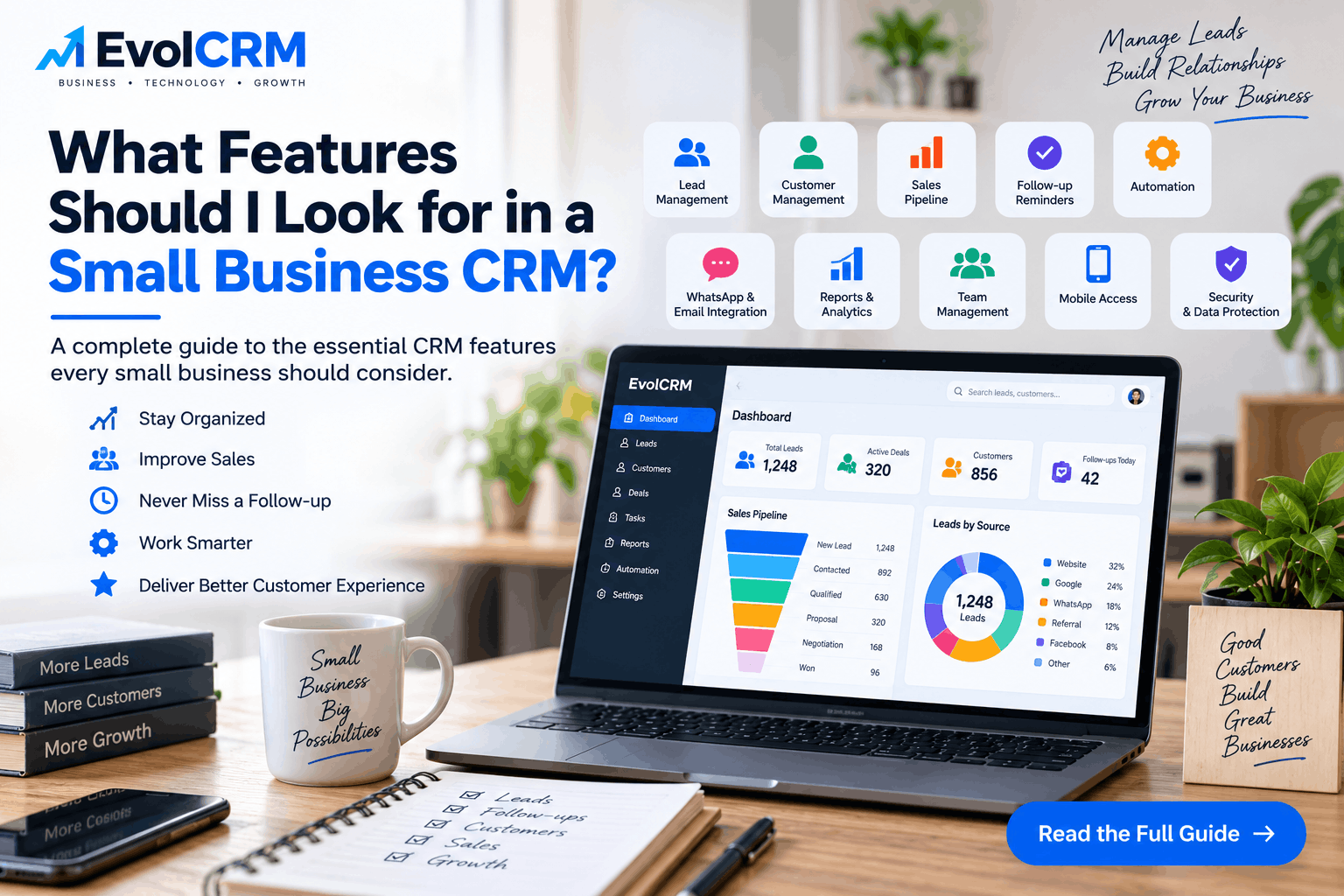
A visual sales pipeline is a game-changer. It shows your deals as cards moving through stages like "New Lead," "Contacted," "Qualified," "Proposal Sent," and "Won/Lost" . This sales pipeline software gives you a quick snapshot of your opportunity management and revenue potential. It's a core part of any sales CRM.
4. Follow-Up Reminders
One of the primary reasons small businesses fail to convert leads is a lack of timely follow-up. A CRM should automatically remind you of today's follow-ups, flag upcoming ones, and highlight overdue tasks. This feature helps maintain momentum and ensures that no lead is forgotten . This is a crucial part of lead follow-up software.
5. Task Management
Your CRM should double as a to-do list. It should allow you to assign tasks, set deadlines, and prioritize activities . This is essential for holding team members accountable and ensuring that sales activities are completed. This is a key part of a sales management software ecosystem.
6. Lead Source Tracking
Are you getting more customers from Google, Facebook, or word-of-mouth? Lead source tracking gives you this insight . By tracking where each lead originates, you can understand which marketing channels are most effective and allocate your budget accordingly.
7. Customer Communication History
This is where the magic happens. Log all customer interactions from your CRM. This includes calls, emails, WhatsApp conversations, and meeting notes, keeping it all as part of the customer's record . This comprehensive communication history ensures you have full context for every conversation.
8. CRM Dashboard
A good CRM dashboard provides a high-level summary of your business health at a glance . Look for key metrics such as:
- Total and new leads
- Qualified vs. lost leads
- Pending and overdue follow-ups
- Total sales value
9. Reporting & Analytics
Dashboards give you a quick pulse check, but CRM reports let you dive deep. Generate reports on lead performance, sales conversion rates, lead sources, and individual employee performance . These CRM analytics are critical for data-driven decision-making.
10. Team & User Management
If you have employees, you need a system that supports them. This feature allows for multiple users, lead assignment, user roles, and permissions, controlling who can see and edit what . This is the essence of team management CRM.
11. Automation
Don't be intimidated by the word "automation." In a small business context, it often means simple, helpful business automation like automatic follow-up reminders, task creation when a deal moves to a new stage, and assigning new leads to a rep . CRM automation saves you hours of manual work.
12. Mobile CRM
Your team isn't always at a desk. A mobile CRM app allows you to access customer records, update deals, and log interactions from anywhere . This CRM anywhere access is crucial for staying responsive in today's fast-paced world.
13. Integrations
Your CRM shouldn't be an island. Look for CRM integrations with the tools you already use, like email, WhatsApp, your website, and your accounting software . Good CRM API integration ensures your systems talk to each other, eliminating data silos.
14. Security & Access Control
Protecting customer data is non-negotiable. Your CRM should offer robust CRM data security, including user permissions, role-based access, and secure authentication. For a detailed look at how to structure your business processes, our guide on CRM software development can provide helpful insights.
15. Cloud Access
The vast majority of modern CRMs are cloud-based. This provides the advantage of accessing your data from anywhere with an internet connection, automatic updates, and scalability. This cloud CRM model eliminates the need for expensive on-premise servers.
Which CRM Features Are Most Important for a Small Business?
With so many features, it's helpful to prioritize. Categorize them into must-haves, nice-to-haves, and advanced features you might not need.
Must-Have
- Lead Management
- Customer/Contact Management
- Sales Pipeline
- Follow-up Reminders
- Task Management
- Basic Dashboard & Reports
- User Management
Good to Have
- Automation (basic workflows)
- Mobile CRM
- WhatsApp/Email Integrations
- Lead Source Tracking
- Advanced Reports
Advanced (Often unnecessary for small businesses)
- AI-driven forecasting
- Complex, multi-step workflow automation
- Advanced analytics and attribution
The goal is to find CRM software for small business that meets your needs today. Avoid paying for complex features you will never use. As one expert notes, "Start with what you need now and add capabilities as you grow" .
CRM Features by Business Type
Different businesses use CRMs in different ways . Here's a quick breakdown:
Service Businesses
Focus on leads, customers, follow-ups, appointments, and task management.
Sales Teams
Focus on sales pipelines, opportunities, follow-ups, reports, and team performance.
Agencies
Focus on leads, clients, projects, tasks, communication, and reporting.
Retail Businesses
Focus on customers, sales history, repeat customers, and communication.
Real Estate Businesses
Focus on property leads, lead sources, follow-ups, agents, and sales pipelines.
Small Startups
Focus on lead management, customer management, sales pipeline, automation, and integrations.
CRM vs Excel for Small Business
Spreadsheets might work when you have 50 customers, but they break down quickly. This is a critical part of any CRM buying guide for small business.
When Excel is Enough
- Small contact list: You have fewer than 100 contacts.
- Single user: You're a solo founder with no team needing access.
- Simple sales process: You don't have a complex pipeline to track.
Why a CRM is Better
- Centralized Data: No more "Sales_CRM_FINAL_v3.xlsx" email chains .
- Follow-up Reminders: Excel can't automatically prompt you to call a lead next week.
- Multiple Users: Version control is a nightmare with spreadsheets. A CRM allows for collaboration .
- Sales Pipeline: A CRM provides a visual, stage-based view of your deals .
- Automation: Spreadsheets can't send an automatic follow-up email or create a task for you.
- Reporting & Customer History: Reports are manual and cumbersome in Excel.
- Permissions: Control exactly what each team member sees.
- Scalability: A CRM grows with you, whereas Excel becomes increasingly messy and error-prone.
How Much Does Small Business CRM Software Cost?
CRM pricing for small business varies widely. It typically depends on:
- Number of users
- Features included
- Storage space
- Automation capabilities
- Integrations
- Mobile app access
- Level of support
- Customization
The cost structure usually falls into these categories:
- Free CRM: Often limited to a certain number of users or basic features.
- Low-cost/Starter CRM: Typically priced per user, per month, with core features .
- Subscription CRM: Tiered pricing based on features and user count.
- Custom CRM: This can be expensive and is rarely necessary for a small business.
How to Choose the Right CRM for Your Small Business
Follow this practical CRM checklist for small business to make the right choice .
- Identify Your Business Process: Map out your current sales process from start to finish.
- List Your Must-Have Features: Start with the 'Must-Have' list in this guide.
- Determine the Number of Users: Know how many people will need access.
- Check Integrations: Does it connect with your email, website, and accounting?
- Check Mobile Access: Does the mobile app work well?
- Evaluate Ease of Use: Can your team learn it quickly? A complex system is often abandoned.
- Check Security and Permissions: Does it have the right access controls?
- Review Reporting: Can it generate the reports you need?
- Consider Scalability: Will it handle your business in 2-3 years?
- Compare Total Cost: Understand the full cost of ownership, not just the monthly subscription.
Common CRM Mistakes Small Businesses Should Avoid
Avoid these pitfalls to ensure a successful CRM implementation:
- Buying Too Many Features: Start simple. Don't get enticed by bells and whistles you don't need.
- Choosing Complicated Software: Adoption will fail if the system is too difficult to use.
- Ignoring User Experience: Your team needs to actually enjoy using it.
- Not Importing Existing Customer Data: This is crucial for a smooth transition .
- Not Training Employees: Invest time in training from day one.
- Not Defining Sales Stages: You need a clear process before you can manage it.
- Not Using Follow-Up Reminders: This is the whole point!
- Ignoring Reports: Data-driven decisions are better.
- Choosing Software Without Checking Integrations: An isolated CRM is a headache.
- Focusing Only on Price: The cheapest option is not always the best value.
EvolCRM for Small Business
When you're ready to step away from the chaos of spreadsheets, consider a solution designed for the modern small business. EvolCRM offers a platform that can centralize your entire sales process .
EvolCRM supports key capabilities like lead management, customer management, sales pipeline, follow-up reminders, task and workflow management, reporting, and team management. Explore how a business CRM software like EvolCRM can be the single source of truth for your business.
If you're looking to streamline your operations, getting started is simple. For more advanced needs, our business automation software and CRM software development capabilities can provide tailored solutions. Explore our CRM software for small businesses or learn more about our lead management software and customer management software to see how we can help.
Frequently Asked Questions
1. What CRM features should a small business have?
The core features include lead management, customer and contact management, sales pipeline management, follow-up reminders, task management, and basic reporting. Starting with these essentials is recommended .
2. What are the most important CRM features for small businesses?
Lead and contact management, a visual sales pipeline, and automated follow-up reminders are widely considered the most essential features for a growing small business .
3. Is CRM software useful for a small business?
Yes. A CRM centralizes your customer data, automates follow-ups, and provides clear visibility into your sales pipeline, which is extremely useful, even for a small team .
4. What is the best CRM for small business?
There is no one-size-fits-all answer. The "best" CRM depends on your specific needs, budget, and team size. The guide above helps you evaluate the best options for your business.
5. How much does CRM software cost for a small business?
Costs vary based on the provider, number of users, and features. Many small businesses find affordable options in the low-cost or free tiers, with paid plans scaling as they grow .
6. Is CRM better than Excel for customer management?
For most businesses, yes. While Excel can work for a very small operation, a CRM is superior for data centralization, collaboration, automation, and reporting .
7. Does a small business need CRM automation?
Automation helps small businesses save time and prevent human error. Simple automations, like assigning new leads and setting follow-up reminders, are very beneficial for a small team .
8. What is lead management in CRM?
Lead management refers to the process of capturing, tracking, qualifying, and assigning leads until they become customers. It is a fundamental function of a CRM system .
9. What is sales pipeline management?
It is a visual representation of where your potential sales are in your process, typically divided into stages like "New Lead," "Contacted," and "Won" .
10. Can a CRM integrate with WhatsApp?
Yes, many modern CRMs offer integrations with WhatsApp, allowing you to send messages and log conversations directly within the customer's record .
11. Can small businesses use a mobile CRM?
Yes, most reputable CRM providers offer a mobile CRM app for iOS and Android, allowing you to manage your business from anywhere .
12. What CRM features help with follow-ups?
Follow-up reminders, automated task creation, and email/SMS automation tools are key features for keeping deals moving and ensuring no lead is forgotten .
13. How does CRM improve customer management?
A CRM centralizes all customer information and interaction history, creating a complete picture of each customer. This ensures that you can provide better, more personalized service .
14. What should I check before buying CRM software?
Check for integrations with your existing tools, mobile functionality, ease of use, security features, and the ability for the software to scale as your business grows .
15. Can CRM software be customized for a small business?
Yes, many CRM systems allow you to customize fields, pipelines, and workflows to match your specific business process .