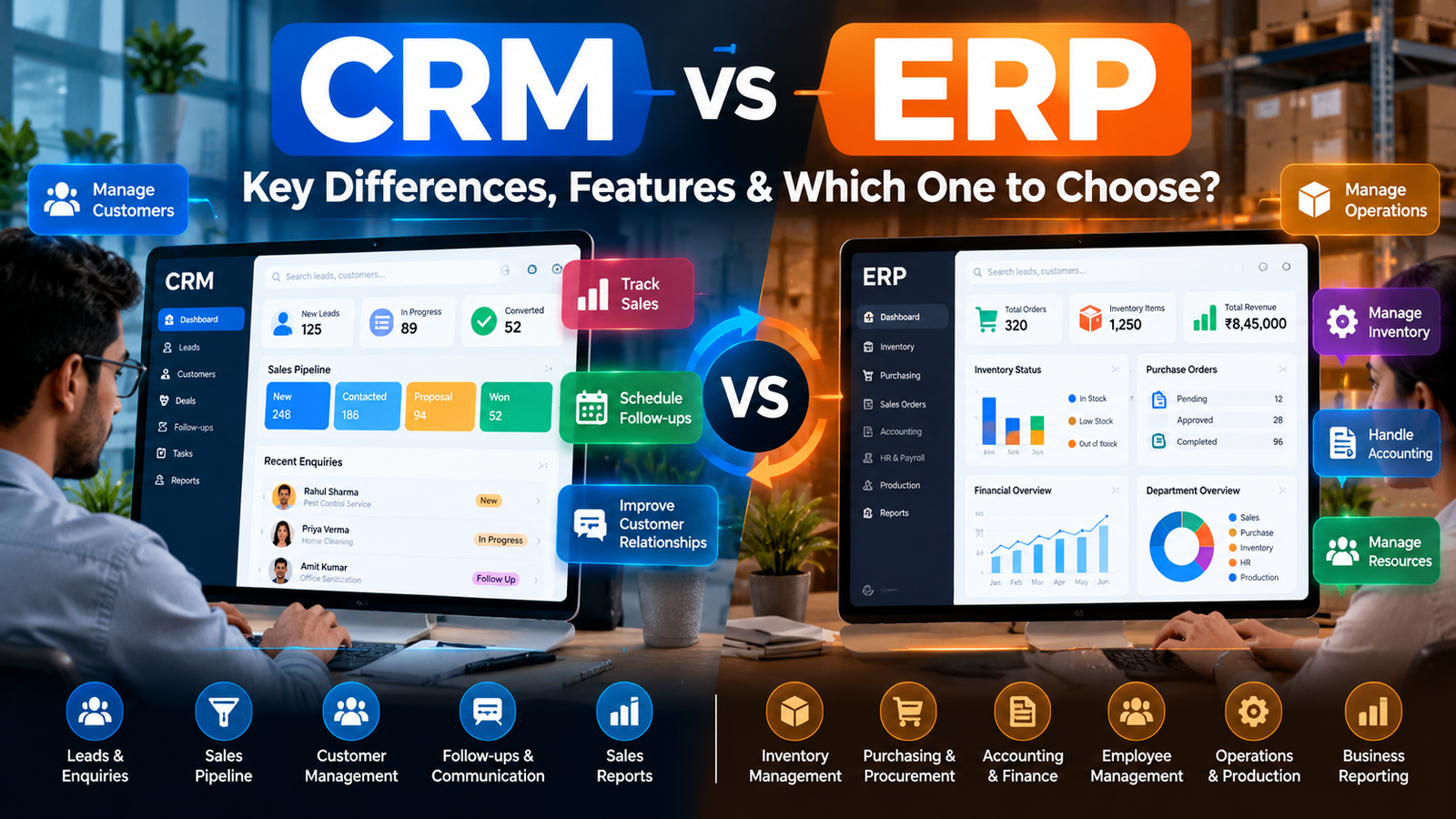
CRM (Customer Relationship Management) primarily helps businesses manage customer relationships and sales processes, while ERP (Enterprise Resource Planning) integrates broader business operations such as finance, inventory, procurement, and supply chain management. The best choice depends on your company’s business model, size, and operational priorities.
Key Takeaways
- CRM focuses on the front office — leads, customers, sales pipelines, and revenue generation
- ERP focuses on the back office — finance, inventory, procurement, and operational efficiency
- Most small service businesses should start with CRM, as customer relationships directly drive revenue
- ERP becomes valuable when operational complexity grows — multiple locations, complex inventory, or multi-entity accounting
- The two systems complement each other and can be integrated for a complete business view
- Integration matters more than the individual tools — disconnected systems create data silos and manual work
What Is CRM Software?
Customer Relationship Management (CRM) software gives businesses a single place to track, manage, and analyze interactions with customers and prospects . The primary goal is strengthening customer relationships to drive revenue growth.
CRM systems typically handle:
- Lead and enquiry management — capturing and organizing potential customers
- Customer contact history — recording every interaction across channels
- Sales pipeline tracking — monitoring deals from first contact to close
- Follow-up reminders and automation — ensuring no lead slips through the cracks
- Customer communication — email, calls, and messaging in one place
- Appointment and service scheduling — coordinating customer-facing activities
- Sales reporting and performance tracking — understanding what works
- Customer retention — identifying opportunities for repeat business
A Practical CRM Example
Consider a pest control company. When a customer calls about an infestation, the CRM records their contact details, service address, and specific problem. The system assigns the lead to a salesperson, schedules a technician visit, and sets a follow-up reminder to confirm satisfaction after service. Without CRM, this information might be scattered across notebooks, spreadsheets, and individual phones — leading to missed follow-ups and lost repeat business.
EvolCRM provides CRM solutions designed for service-based businesses, helping teams organize enquiries, follow-ups, and customer relationships.
What Is ERP Software?
Enterprise Resource Planning (ERP) software coordinates business-wide operations by integrating core processes across departments . Think of ERP as a central database that connects finance, operations, and resources into one system.
ERP systems can include modules for:
- Accounting and financial management — general ledger, accounts payable/receivable, budgeting
- Inventory and stock control — tracking materials and products across locations
- Procurement and purchasing — managing vendors and purchase orders
- Order processing and fulfillment — from sales order to delivery
- Production and manufacturing — planning, scheduling, and quality control
- Human resources and payroll — employee records and compensation
- Supply chain operations — coordinating suppliers and logistics
- Business-wide reporting — real-time visibility into company performance
Important note: ERP modules vary significantly by product. Not every ERP includes every feature listed above.
A Practical ERP Example
A manufacturing company receives an order for custom furniture. The ERP system checks raw material inventory, creates a purchase order for missing supplies, schedules production based on available capacity, generates the invoice upon completion, and updates financial records — all within one connected system. Finance sees the cost, operations sees the schedule, and management sees the profit margin.
CRM vs ERP: Key Differences
The distinction between CRM and ERP comes down to focus and scope.
CRM focuses outward — on customers, leads, and revenue generation. It is primarily used by sales, marketing, and customer service teams. The core data includes contacts, interactions, opportunities, and communication history. The main benefit is better customer visibility and sales coordination .
ERP focuses inward — on resources, processes, and operational efficiency. It is primarily used by finance, operations, procurement, and inventory teams. The core data includes financial transactions, stock levels, orders, and resource allocation. The main benefit is better operational visibility and process coordination .
A simple rule of thumb: If your problem is about selling more or serving customers better, you need CRM. If your problem is about running your business more efficiently, you need ERP.
Important clarification: Modern CRM and ERP products can overlap in certain functions. Many ERPs include basic CRM modules, and some CRMs offer features that touch on operational data. However, dedicated systems typically provide deeper functionality in their respective domains .
CRM vs ERP: Real-World Business Examples
Pest Control Company
CRM manages: Customer enquiries, quotations, service schedules, technician assignments, follow-ups, and customer history.
ERP may manage: Accounting, purchasing, chemical and equipment stock, payroll, and broader financial operations.
E-commerce Business
CRM manages: Customer communications, sales campaigns, and retention efforts.
ERP coordinates: Inventory across warehouses, procurement, order processing, and financial records.
Manufacturing Company
CRM manages: Leads, customer relationships, and sales opportunities.
ERP manages: Production planning, raw materials, purchasing, and operational finances.
Small Digital Agency
CRM tracks: Prospects, sales enquiries, proposals, and client follow-ups.
ERP or business management software may coordinate: Accounting, expenses, procurement, and internal resources.
These are illustrative workflows. Actual functionality depends on the chosen software.
CRM vs ERP: Which Is Better for Small Businesses?
Neither category is universally better. The right choice depends on your biggest operational challenge.
Choose CRM first when your priority is:
- Organizing leads and customer information
- Improving sales follow-up consistency
- Tracking quotations and opportunities
- Managing customer communication
- Coordinating customer-facing services
Choose ERP (or evaluate it) when your priority is:
- Coordinating inventory across multiple locations
- Managing complex purchasing and procurement
- Integrating financial and operational processes
- Handling manufacturing or supply chain complexity
- Consolidating data across departments
For most small service businesses, CRM is the relevant first investment. ERP becomes valuable as operational complexity grows — typically at 50+ employees or with multi-location operations .
Can a Business Use CRM and ERP Together?
Yes. CRM and ERP are designed to complement each other, not compete .
A simple workflow:
- A salesperson records a lead in CRM
- The lead becomes a customer after a successful sale
- Order information passes to ERP for fulfillment and invoicing
- ERP manages inventory, purchasing, and financial processes
- Payment and fulfillment status sync back to CRM
- Customer-facing teams use updated information for communication
Integration considerations: API compatibility, data synchronization rules, access permissions, duplicate prevention, and ongoing maintenance all affect integration success. Native integrations are simpler; custom integrations offer more flexibility but require more resources .
Research confirms that integrating CRM and ERP systems produces greater business value than using either system alone .
CRM vs ERP: Cost and Implementation
Total cost depends on multiple factors, not just subscription price:
Cost factors include: Subscription or licensing fees, number of users, required features and modules, customization needs, data migration, integrations, employee training, hosting, and ongoing support.
Implementation complexity: CRM implementation for a small service business can often be completed in days to weeks. ERP implementation is typically measured in months and requires dedicated project management .
Total cost of ownership should guide decisions — not just the initial subscription price.
How to Choose the Right Software for Your Business
A practical checklist:
- Identify your biggest operational problem — customer management or operational coordination?
- List workflows that need improvement — what specifically is broken?
- Determine which teams will use the system — sales, operations, or both?
- Identify required reports — what information do you need to make decisions?
- Check integration needs — what other systems must connect?
- Review security and permissions — who should access what data?
- Compare customization and scalability — can it grow with you?
- Test with a realistic workflow — does it fit how you actually work?
- Estimate total costs — not just subscription, but implementation and maintenance
- Choose what solves your current priority without unnecessary complexity
Decision guide:
- Customer and sales management problems → Start by evaluating CRM
- Inventory, accounting, and operations problems → Evaluate ERP
- Both customer and operational problems → Consider integrated systems or compatible standalone products
Common CRM and ERP Mistakes to Avoid
- Buying software without defining business requirements first
- Expecting CRM to replace every operational system
- Assuming ERP automatically improves customer relationships
- Ignoring data migration and integration requirements
- Paying for unnecessary modules or features
- Failing to train employees on the new system
- Overlooking access control and data security
- Choosing a system without evaluating future maintenance needs
Frequently Asked Questions
What is the difference between CRM and ERP?
CRM manages customer relationships and sales processes, focusing on external interactions. ERP manages internal business operations including finance, inventory, and procurement. CRM drives revenue; ERP drives operational efficiency. They serve different teams and solve different problems .
What does CRM stand for?
CRM stands for Customer Relationship Management. It refers to software and strategies for managing interactions with customers and prospects throughout the customer lifecycle .
What does ERP stand for?
ERP stands for Enterprise Resource Planning. It refers to software systems that integrate core business processes — finance, inventory, procurement, HR — into a unified platform .
Is CRM part of ERP?
Not typically. While some ERP systems include basic CRM modules, dedicated CRM platforms offer deeper functionality for sales, marketing, and customer service. Most organizations use separate, integrated systems .
Can ERP software replace CRM?
No. ERP lacks the depth of dedicated CRM for managing sales pipelines, marketing campaigns, and customer communication. A CRM module within an ERP is usually basic compared to standalone solutions .
Do small businesses need both CRM and ERP?
Most small service businesses only need CRM initially. ERP becomes relevant as operational complexity grows — typically with multiple locations, complex inventory, or 50+ employees. Start with the system that solves your most urgent problem .
Which is better for a service-based business?
CRM is typically the right starting point for service businesses. Customer relationships, bookings, follow-ups, and service history are directly managed in CRM. ERP may become relevant for larger operations with complex back-office needs .
Can CRM and ERP be integrated?
Yes. Integration allows data to flow between systems — customer and order information from CRM, financial and inventory data from ERP. Most modern platforms offer APIs or native integrations .
Is CRM cheaper than ERP?
Generally, yes. CRM systems for small teams often start at affordable monthly rates. ERP systems typically cost more due to licensing, implementation complexity, and ongoing maintenance. However, actual costs depend on specific requirements .
How do I choose between CRM and ERP?
Start by identifying your biggest operational problem. If customer management and sales are the priority, choose CRM. If financial control, inventory, and operations are the priority, evaluate ERP. For both, consider integration options.
Conclusion
The difference between CRM and ERP comes down to focus: CRM manages customer relationships and revenue generation, while ERP coordinates internal resources and operational efficiency. For most small service businesses in India, CRM is the practical first step — it directly addresses the customer-facing processes that drive revenue. ERP becomes valuable as operational complexity grows.
Software selection should begin with your actual challenges, required workflows, budget, and growth plans — not with the technology itself.
Looking to organize customer enquiries, follow-ups, and service operations? Explore EvolCRM’s CRM solutions and discover how the right software can support your business workflows.