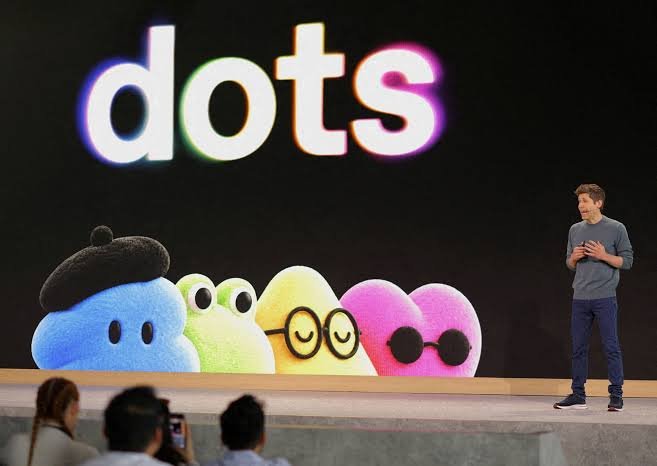
OpenAI announced dots — always-on AI agents built to handle work on your behalf. Dots are powered by GPT-6 Astra, each with their own cloud computer, and can connect to over 4,000 apps through OpenAI's plugin ecosystem. They are rolling out today to ChatGPT Pro, Business Premium, and Enterprise users in eligible markets.
This article explains what dots are, what they can do, how they work inside organisations, how OpenAI is handling safety and permissions, and how to get started.
What Are Dots?
Dots are always-on AI agents from OpenAI that work on your behalf. Each dot has its own cloud computer, browser, and connected apps, and can work toward your goals 24/7. They are powered by GPT-6 Astra, learn from feedback over time, and can be reached through ChatGPT, Slack, and Teams. Your first dot is included with Pro and Business Premium plans at no extra cost.
What Makes Dots Different
Most AI assistants respond to prompts. They wait for you to ask something, then answer. Dots work differently. They are designed to be always-on agents — they have their own environment, they can work independently, and they can take on long-running tasks without needing step-by-step direction.
Three things stand out:
Their own cloud computer. Each dot has its own cloud computer, browser, and apps. You can open the dot's computer at any time to inspect what it is doing. You can also give a dot permission to use your own laptop, so it can work directly alongside you.
Persistence and learning. The more you work with your dot, the more it learns your preferences, how you think, and what good looks like to you. It carries context across every channel — start a project in ChatGPT, share context in Slack, and the dot follows through.
Autonomous work. A dot can take a project and run with it, even while working on several others. You can keep bringing it new tasks and ideas without having to manage separate threads or direct every step.
This is a shift from "AI that answers" to "AI that acts."
What Dots Can Actually Do
OpenAI shared several examples of how dots are being used, both inside the company and by early testers. These are concrete illustrations, not hypotheticals.
Turn feedback into tested fixes (for developers)
A developer's dot watches customer feedback for recurring requests, scopes smaller improvements and bug fixes, builds and tests them, and brings complete pull requests to review — with attached videos showing the changes. The developer can keep building the next major feature while reviewing the fixes the dot prepared.
Revise a launch as scope changes (for product teams)
A product lead's dot learns the audience, positioning, and creative standards. When the product scope changes, it works through what that means for the story, revises the launch materials, and prepares drafts of asset and doc changes. The lead returns to a launch plan shaped by the direction they set, ready for review.
Update analysis with new evidence (for scientists)
A scientist's dot learns the research question and how they evaluate evidence. As new data arrives, it reruns analyses, investigates unexpected results, and updates figures for the paper. When findings change, it revises the supporting explanation and flags what needs review.
Update a proposal as requirements shift (for sales leads)
A sales lead's dot checks customer requirements and account history against product docs, finds what still needs testing, builds a proof of concept for a key integration, and suggests a solutions engineer who has handled a similar deal. As requirements and test results change, it updates the proposal and test plan and flags open concerns.
Automate content production work (for creators)
A creator's dot learns their voice and what matters to their audience. When a new interview transcript arrives, it identifies moments for clips, prepares show notes, and drafts social posts for approval. It carries edits across materials and learns what resonates.
Inside OpenAI
A bug appears in Slack, and dots immediately start investigating. A new design arrives, and dots turn it into a working app while the team focuses on customer feedback. A planning cycle gets underway, and dots keep everyone moving in sync toward the deadline. An early tester's dot noticed he had forgotten to invoice a publication, prepared the invoice, and sent it after his approval.
These are the kinds of tasks that consume hours of human attention. Dots are designed to take them off your plate — with you still in control of the decisions that matter.
Where You Can Work with Dots
Working with a dot is designed to feel like a conversation. You can:
- Message or call dots in ChatGPT on desktop, web, and mobile
- Message dots in Slack and Teams, with texting coming soon
- Hop on a voice call when you need to talk something out
- Let dots message you with progress, questions, or decisions that need you
Dots carry context across every channel, so wherever you reach them, they have the full picture. Start a project in ChatGPT, share context with the working team in Slack, and let your dot follow through.
You're Always in Control
Dots build on ChatGPT's existing protections with additional safety and privacy safeguards. The core idea: dots work on your behalf, within boundaries you set.
Built-in Safeguards
Each dot works on its own cloud computer. Your computer and its contents stay separate unless you choose to connect them. For signing into supported websites, dots can use saved passwords without exposing them to the model.
When you aren't actively working with a dot, it looks for ways to help in the background — what OpenAI calls "proactive research." It does this using apps you have already connected, with tools restricted to read-only. This means it can't send messages, change app content, or control your browser or computer.
Security safeguards are built into dots to help defend against malicious instructions and to monitor for potentially harmful behaviour. If monitoring detects a safety concern, it can pause or stop the dot's work.
Access and Permissions
You choose which apps dots can access and manage their permissions through your existing ChatGPT app controls.
Dots start with built-in rules for when to act independently and when to ask for approval. Custom Rules let you allow specific actions, require approval, or block them. Built-in safety requirements always apply. You can follow progress — including background work — in Activity View and redirect dots as needed.
On data usage: OpenAI does not use content from ChatGPT Business, Enterprise, or Edu workspaces to improve its models by default. On personal ChatGPT plans, you can control whether dots' conversations and work are used to improve the models. OpenAI does not train directly on proactive research or on a dot's notes to itself, though information from those may be used if it helps inform an eligible conversation or task, depending on your settings.
Action Review and Approvals
Dots use auto-review to check actions that could affect your accounts or share information — against your instructions, Custom Rules, and safety requirements. This determines what can proceed, what needs approval, and what you must do yourself.
Certain sensitive tasks — like changing a password — always stay with you.
OpenAI cautions that dots can still make mistakes, and that users should always review consequential work. More detail is available in OpenAI's dots safety blog, Help Center, and system card.
Specialist Dots for Organisations
Your personal dot works on your behalf. Specialist dots take on dedicated responsibilities within an organisation.
Each specialist dot is set up with its own identity, credentials, and access to the systems it needs. As it works, the dot adapts to new information and improves with feedback from the team. OpenAI says it is building on lessons from early testing across procurement, invoice processing, email marketing, customer support, and commercial contracting.
The rollout starts with focused enterprise pilots. OpenAI's engineering teams work directly with organisations to define each dot's responsibilities, the tools it can use, and how people review and approve its work.
If there is work you would like a specialist dot to take on, OpenAI has invited organisations to reach out.
Specialist Dots on Microsoft Agent 365
OpenAI is working with Microsoft to integrate specialist dots with enterprise governance and security controls in Microsoft Agent 365. The goal: let businesses manage dots through the Microsoft tools they already use.
This matters for enterprises that need agentic AI to fit within existing identity, compliance, and access frameworks — rather than creating a parallel system to manage.
How to Get Started with Dots
Dots are rolling out today in ChatGPT to Pro and Business Premium users in eligible markets. Enterprise users (including Edu and Healthcare) can try the beta when their workspace admin enables it.
Your first dot is included in your Pro or Business Premium plan at no extra cost. It is available 24/7 to talk, help you think, and stay on top of what matters to you. Your plan also includes an allowance for deeper work, with extended limits for the first month after launch.
In the future, you will be able to add more dots and scale the output of each dot by increasing its speed or the total amount of work it can take on per month.
Usage note: Conversations with your dot do not count toward your ChatGPT usage limits. When you ask your dot to start or manage tasks in Codex or ChatGPT Work, those tasks count toward your usage limits as usual.
To get started:
- Create your first dot in the ChatGPT desktop app or your desktop browser
- Give it a name and make it your own
- Connect your apps
- Let it introduce itself
- After initial setup, you can message it from the ChatGPT mobile app
OpenAI says it will keep improving dots as it learns what makes them useful every day, and will share what it learns where it can.
What Dots Mean for Different Users
For Individual Professionals
If you juggle multiple projects, dots can take on long-running tasks that currently consume your attention in fragments — research, drafting, follow-ups, and file organisation. The value is not that the dot is smarter than you; it is that it keeps working when you are not.
For Developers
The pull-request example is the clearest signal: dots can watch feedback, scope fixes, build them, test them, and hand you a reviewed PR with a video. That is real leverage on routine engineering work.
For Product and Marketing Teams
The launch revision example shows dots absorbing the "scope changed, now everything needs updating" problem. That is often days of coordination work compressed into a single review cycle.
For Scientists and Researchers
The analysis example shows dots tracking evidence over time — rerunning analyses as data arrives, updating figures, and flagging what needs review. This is the kind of sustained task that often falls to a research assistant or gets delayed.
For Sales Teams
The proposal example shows dots maintaining a live, accurate document as requirements shift. Instead of a proposal going stale between updates, the dot keeps it current and flags open concerns.
For Creators
The content example shows dots learning a creator's voice, drafting posts and show notes, and carrying edits across materials — freeing the creator to spend more time on the actual creative work.
For Enterprises
Specialist dots and the Microsoft Agent 365 integration signal that OpenAI is treating enterprise governance as a first-class concern, not an afterthought. Organisations interested in pilots should reach out directly.
Frequently Asked Questions
What are dots?
Dots are always-on AI agents from OpenAI. Each dot has its own cloud computer, browser, and connected apps, and can work toward your goals 24/7. They are powered by GPT-6 Astra and are designed to take important work off your plate.
How are dots different from ChatGPT?
ChatGPT responds to prompts. Dots work independently on longer tasks, have their own cloud computer, learn from your feedback over time, and can reach out to you with progress or questions. They are an extension of ChatGPT, not a replacement.
What model powers dots?
Dots are powered by GPT-6 Astra.
How many apps can dots connect to?
Through OpenAI's plugin ecosystem, dots can connect to over 4,000 apps.
Where can I use dots?
You can message or call dots in ChatGPT on desktop, web, and mobile. You can also message them in Slack and Teams. Texting is coming soon.
How do I create a dot?
Create your first dot in the ChatGPT desktop app or your desktop browser. Give it a name, connect your apps, and let it introduce itself. After setup, you can message it from the ChatGPT mobile app.
Which plans include dots?
Dots are rolling out to Pro and Business Premium users in eligible markets. Enterprise users (including Edu and Healthcare) can try the beta when their workspace admin enables it. Your first dot is included in Pro and Business Premium at no extra cost.
Do dot conversations count toward my ChatGPT usage limits?
No. Conversations with your dot do not count toward your ChatGPT usage limits. However, when you ask your dot to start or manage tasks in Codex or ChatGPT Work, those tasks count toward your usage limits as usual.
Can I add more dots later?
Yes. OpenAI plans to let you add more dots in the future and scale the output of each dot by increasing its speed or the total amount of work it can take on per month.
What is proactive research?
Proactive research is when your dot looks for ways to help in the background when you aren't actively working with it. It uses apps you have already connected, with tools restricted to read-only, so it cannot send messages, change app content, or control your browser or computer.
What are Custom Rules?
Custom Rules let you control when a dot acts independently and when it needs approval. You can allow specific actions, require approval, or block them. Built-in safety requirements always apply.
What is auto-review?
Auto-review is how dots check actions that could affect your accounts or share information against your instructions, Custom Rules, and safety requirements. It determines what can proceed, what needs approval, and what you must do yourself.
What tasks always stay with the user?
Certain sensitive tasks, such as changing a password, always stay with you.
What are specialist dots?
Specialist dots are dots set up by an organisation for dedicated responsibilities. Each has its own identity, credentials, and access to the systems it needs. They are starting with focused enterprise pilots.
What is Microsoft Agent 365?
Microsoft Agent 365 is Microsoft's enterprise governance and security platform. OpenAI is working with Microsoft to integrate specialist dots so businesses can manage them through the Microsoft tools they already use.
Does OpenAI use my dot's data to train models?
OpenAI does not use content from ChatGPT Business, Enterprise, or Edu workspaces to improve its models by default. On personal plans, you control whether dots' conversations and work are used. OpenAI does not train directly on proactive research or on a dot's notes to itself, though information from those may inform eligible conversations or tasks depending on your settings.
Can dots make mistakes?
Yes. OpenAI states that dots can still make mistakes and advises users to always review consequential work.
What if I want a specialist dot for my organisation?
OpenAI is starting with focused enterprise pilots and has invited organisations to reach out if there is work they would like a specialist dot to take on.
Final Thoughts
Dots are OpenAI's bet that the next phase of AI is not about better answers — it is about always-on work. A dot is not a smarter chatbot. It is an agent with its own environment, its own tools, and the ability to keep going when you are not watching.
The examples OpenAI shared are grounded in real workflows: developer fixes, launch revisions, scientific analysis, sales proposals, content production. None of them are hypothetical. Inside OpenAI, dots are already running Slack investigations, building prototype apps from designs, and keeping planning cycles in sync.
The safety architecture — separate cloud computer, read-only proactive research, Custom Rules, auto-review, and sensitive tasks staying with the user — reflects how seriously OpenAI is treating trust. The company is also being clear that dots can make mistakes.
The practical path forward for most users: if you are on Pro or Business Premium, create your first dot, connect a few apps, and see how it handles one ongoing task. For organisations, the specialist dots and Microsoft Agent 365 integration suggest a deeper enterprise play is coming, starting with pilots.
Dots are not the finished form of AI agents. They are the beginning of one. Watch this space.