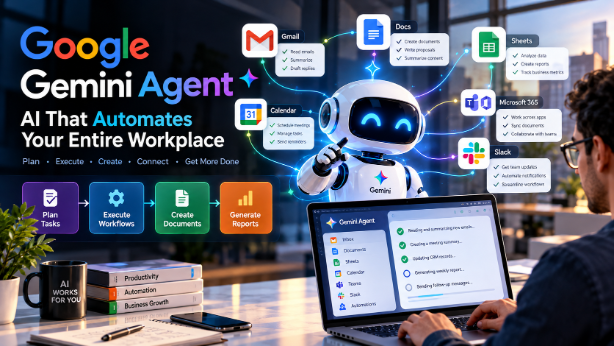
Google launched Gemini Agent on October 8, 2026, a universal AI agent for workplace automation that can plan and execute multistep tasks, create documents, write code, and connect across Google Workspace, Microsoft 365, and Slack. Unlike traditional chatbots that respond to prompts, Gemini Agent operates as a persistent digital coworker with its own identity, working autonomously while maintaining enterprise-grade security and governance controls.
Key Takeaways
- Gemini Agent is a single, universal agent for work that handles knowledge work, content creation, coding, and question-answering from one interface
- It operates across major platforms including Google Workspace, Microsoft 365, Slack, and third-party applications via headless agent mode
- Coworker agents receive their own identity, including email addresses, calendar access, and directory listings, enabling team-level collaboration
- Gemini orchestrates across multiple AI models including Google's Gemini and Anthropic's Claude, routing tasks to the best model for quality and cost
- Enterprise governance includes spend caps, per-agent audit trails, and an Agent Sandbox for security isolation
- Pricing and general availability remain unconfirmed, with the product in private preview as of the announcement
What Is Google Gemini Agent?
Google Gemini Agent is a universal AI agent for workplace automation announced by Google Cloud CEO Thomas Kurian at the Gemini at Work 2026 event on October 8, 2026. Google describes it as "a single, universal agent for work that answers your questions, handles your knowledge work, creates your images and media, and writes and runs code."
The key distinction from previous AI assistants is delegation. Users describe what they want accomplished, and the agent determines how to complete it, plans the necessary steps, uses available tools and integrations, and delivers the finished result. Google frames this as a shift where "work now starts in the prompt window."
Unlike a traditional chatbot that responds to individual prompts, Gemini Agent operates persistently in the cloud. Tasks that take hours or days continue executing even after the user closes their laptop. It maintains a single memory and personalization graph across all devices and channels.
Key Features of Gemini Agent
Multistep Task Planning and Execution
Gemini Agent can break complex goals into sub-tasks, sequence them logically, and execute them using available tools. It supports both temporary sub-agents for individual jobs and persistent "coworker agents" that hold ongoing roles within a team.
Document Creation and Information Synthesis
The agent creates and edits documents, spreadsheets, presentations, and other content directly within Google Workspace applications. It can synthesize information across multiple sources and produce finished deliverables.
Coding Assistance
Gemini Agent writes and executes code as part of its task capabilities. Google positioned coding as a foundational capability that enables broader agentic workflows.
Platform Integrations
The agent operates within Google Workspace applications including Gmail, Drive, Docs, Slides, Sheets, Chat, and Calendar. It also supports Microsoft 365 as a confirmed environment and Slack as a communication channel. Third-party applications can run Gemini Agent as a headless agent embedded in external software. Enterprise systems including Salesforce, ServiceNow, Jira, Snowflake, and BigQuery can connect, along with any server using Model Context Protocol (MCP).
Coworker Agents with Independent Identity
A notable feature is the coworker agent model. Managers can describe a role, and Gemini creates an agent with its own Workspace account, including a dedicated email address (e.g., @agents.company.com), calendar, Drive storage, and company directory listing. Each agent operates under its own identity and sees only information explicitly shared with it.
Multi-Model Orchestration
Gemini Agent does not rely on a single AI model. It currently orchestrates across Google's Gemini models and Anthropic's Claude models, with support for additional private and open models planned. A Smart Routing capability assigns each workload to the model that best balances quality and cost.
Enterprise Governance and Security
Google emphasized governance capabilities including cryptographically attested agent identity, where each agent has a verifiable digital identity. OAuth-propagated permissions ensure agents operate within defined access boundaries. Action-level audit trails log every agent action and attribute it to the agent. An Agent Sandbox provides a walled-off environment isolating agent operations. An Agent Gateway is described as an "AI network firewall" for agent traffic. Real-time spend caps set per-project budget limits that automatically pause agents when reached.
How Gemini Agent Could Change the Way Businesses Work
The agent's design supports scenarios where employees delegate complete workflows rather than individual tasks. Practical examples include the following.
Preparing weekly business reports: An employee could request a summary of pipeline activity, regional performance, or project status. The agent would query relevant systems, synthesize the data, and produce a formatted report. Human review would still be advisable before distribution.
Organizing meetings and calendars: The agent can coordinate scheduling across participants, resolve conflicts, and send invitations. For external meetings, human approval of the final schedule may be appropriate.
Summarizing business correspondence: The agent can process email threads, extract action items, and prepare summaries. For sensitive communications, users should verify the agent's interpretation.
Drafting proposals and internal documents: The agent can generate first drafts based on templates and available information. Human editing and approval remain necessary before external use.
Assisting with data analysis: The agent can query databases, identify trends, and produce visualizations. Verification of analytical conclusions is recommended given the risk of misinterpretation.
Coordinating administrative tasks: The agent can manage task lists, send reminders, and track completion status. For consequential actions, approval checkpoints add safety.
These examples represent potential applications based on documented capabilities, not guarantees that every workflow is fully autonomous or currently supported.
AI Agents vs Traditional Chatbots
The fundamental difference between AI agents and traditional chatbots is autonomy. Chatbots operate in a question-answer loop where the human controls each step. Their primary purpose is answering questions and providing information, with no ability to execute tasks or plan multistep sequences. Application integrations are typically limited or nonexistent, and the user drives every interaction.
AI agents like Gemini Agent receive a goal, determine the steps needed, execute them using available tools, and return when the task is complete. They can plan and sequence sub-tasks, connect extensively with applications and APIs, and operate with human oversight at defined checkpoints rather than at every step. Suitable use cases include workflow automation, report generation, and coordination of complex processes.
The distinction matters for businesses evaluating automation tools. Chatbots suit information retrieval and FAQ handling. Agents extend into active task execution and process coordination.
7 Practical AI Agent Use Cases for Small Businesses
CRM automation: Summarize customer records, prepare follow-up drafts, and update contact information. The agent can pull data from connected systems and flag overdue interactions.
Lead qualification: Organize enquiries using predefined criteria, score leads based on engagement signals, and route qualified prospects to appropriate team members.
Customer follow-ups: Draft personalized follow-up messages based on interaction history. Human review before sending remains advisable for relationship-sensitive communications.
Sales reporting: Summarize pipeline activity, identify stalled deals, and generate periodic performance reports from CRM data.
Marketing operations: Assist with campaign planning, content calendar organization, and performance metric compilation across channels.
Administrative automation: Organize meetings, manage document workflows, and maintain task lists with automated reminders and status tracking.
Software development: Assist with code review, documentation generation, and repetitive development tasks like boilerplate creation and testing.
These represent general AI agent opportunities. This is not a guarantee that Gemini Agent currently performs every listed task or integrates directly with EvolCRM.
How AI Agents Can Improve CRM Automation
For service-based businesses such as pest control, home cleaning, and maintenance companies, CRM automation represents a practical entry point for agent adoption. Consider this potential workflow.
A customer enquiry arrives through a website form, email, or phone message. The system extracts relevant information including name, contact details, service type, location, and urgency. A lead record is created or updated in the CRM database. The lead is categorized according to business rules such as service type, geographic territory, or priority level. A follow-up message is drafted using templates and available customer context. The responsible salesperson receives a notification with the lead summary and draft message for review. The system records the outcome and prepares activity reports.
Which steps can be automated depends on the availability of APIs, existing workflow tools, and the level of integration between systems. Steps involving customer communication may benefit from human approval checkpoints, particularly for initial contact or sensitive situations.
EvolCRM's experience in CRM software and custom development provides relevant context for businesses exploring these automation opportunities.
How to Prepare Your Business for AI Agent Automation
A practical implementation roadmap starts with identifying one repetitive workflow with clear inputs, decisions, and outputs. Document the current process in detail.
Define success metrics by establishing measurable goals such as time saved per task, error rate reduction, or response time improvement.
Review integration options by assessing available APIs for your business systems and determining which applications can connect to agent platforms.
Set permissions carefully by granting agents only the access needed for their assigned tasks. Use approval checkpoints for consequential actions.
Test in controlled environments using non-production data where possible to validate agent behavior before live deployment.
Monitor and record by tracking agent actions, reviewing audit logs, and measuring performance against defined metrics.
Expand gradually by demonstrating value in one workflow before adding more automation.
Privacy, data security, and compliance considerations should be addressed before deployment. Ensure that agent access aligns with your organization's data handling policies.
Limitations and Risks of Workplace AI Agents
Incorrect or incomplete outputs: AI models can misunderstand context, miss relevant information, or generate plausible but incorrect results. All consequential outputs should be reviewed.
Accidental changes to business records: An agent with write access could modify or delete data unintentionally. Permission controls and audit trails are essential safeguards.
Excessive permissions and unauthorized actions: Agents granted broad access could take actions beyond their intended scope. Least-privilege principles should apply.
Sensitive customer data exposure: Agents processing customer information must operate within strict data handling boundaries.
Integration failures: API changes, authentication issues, or service outages can disrupt agent workflows.
Unpredictable execution costs: Token-based billing means agent activity can generate variable costs. Real-time spend caps provide a safeguard.
Need for monitoring and human oversight: Google's own design includes approval mechanisms for consequential actions. This reflects recognition that full autonomy carries risk.
What Does Gemini Agent Mean for Software Agencies?
The emergence of capable AI agents shifts the opportunity landscape for software agencies and developers. The focus moves from building standalone chatbots or simple automation scripts toward delivering integrated automation systems that connect business applications, manage data flows, and maintain appropriate governance.
Opportunities include CRM integrations that connect agent platforms to custom or existing CRM systems. Custom business dashboards can surface agent activity and outcomes. Workflow automation involves designing and implementing multistep business processes. API development creates the connections that enable agent systems to access business tools. AI-assisted reporting builds systems that leverage agents for data synthesis and presentation. Business-specific agents can be developed as coworker agents tailored to particular organizational roles. Ongoing software maintenance ensures monitoring, updating, and optimizing agent-integrated systems.
Successful automation projects solve measurable business problems. Adding AI features without clear purpose or measurable outcomes risks wasting resources on technology that does not deliver value.
Businesses interested in exploring custom software, CRM solutions, website development, or business automation can explore EvolCRM's services to discuss potential applications.
Frequently Asked Questions
What is Google Gemini Agent?
Gemini Agent is a universal AI agent for workplace automation announced by Google on October 8, 2026. It plans and executes multistep tasks, creates documents, writes code, and operates across Google Workspace, Microsoft 365, and Slack using multiple AI models.
When was Gemini Agent announced?
Google announced Gemini Agent on October 8, 2026, at the Gemini at Work 2026 event. Google Cloud CEO Thomas Kurian presented the product as part of a broader enterprise AI strategy.
What applications can Gemini Agent work with?
Confirmed integrations include Google Workspace (Gmail, Drive, Docs, Slides, Sheets, Chat, Calendar), Microsoft 365, Slack, Salesforce, ServiceNow, Jira, Snowflake, BigQuery, and any server supporting Model Context Protocol (MCP).
Is Gemini Agent available to everyone?
No. As of the October 2026 announcement, Gemini Agent was in private preview. Google indicated broad availability for Workspace customers on select Business and Enterprise plans was planned, but no general availability date was confirmed.
How is Gemini Agent different from a chatbot?
Chatbots respond to individual prompts. Gemini Agent accepts a goal, plans the necessary steps, executes them using tools and integrations, and delivers finished results. It operates persistently across devices and maintains memory across sessions.
Can AI agents automate CRM workflows?
AI agents can connect to CRM systems via APIs and MCP servers to read, update, and act on customer data. Use cases include lead qualification, follow-up drafting, and reporting. Human approval checkpoints remain advisable for customer communications.
Can small businesses benefit from AI agents?
Yes, for suitable use cases. Small businesses can start with one repetitive workflow, use available integrations, and measure results before expanding. Budget-conscious approaches include dependency scanning, code review, and periodic assessments before full agent deployment.
Are AI agents safe to use with business data?
Safety depends on implementation. Google's design includes cryptographically attested identities, OAuth-propagated permissions, audit trails, sandbox isolation, and spend caps. Organizations should assess their own data sensitivity and compliance requirements.
Can businesses build custom AI agents using APIs?
Yes. Platforms like Vertex AI Agent Builder and protocols like Model Context Protocol enable custom agent development connected to business systems.
Will AI agents replace traditional workflow automation tools?
AI agents extend rather than replace existing automation. Traditional tools handle deterministic, rule-based processes efficiently. Agents add value for tasks requiring natural language understanding, multi-system coordination, and adaptive decision-making.
Conclusion: The Future of AI-Powered Business Automation
Google's Gemini Agent represents a significant step toward systems that coordinate multistep tasks rather than simply answering questions. The product's design, including persistent execution, multi-model orchestration, coworker identities, and enterprise governance, signals that Google views agentic AI as infrastructure for how work gets done, not just a feature enhancement.
For businesses, the practical recommendation remains to choose one repetitive workflow, establish safeguards, measure the outcome, and expand only after demonstrating value. The technology is powerful, but successful adoption depends on disciplined implementation and appropriate human oversight.
EvolCRM provides software development, CRM solutions, website development, and business automation services. Explore our resources on CRM automation, custom software, and API integration to plan your next automation initiative.