Running a small business involves managing enquiries, customers, follow-ups, appointments, invoices, employees and daily operations. As the number of customers grows, managing everything through spreadsheets, notebooks and messaging apps can become difficult.
CRM software helps small businesses organize customer information, manage leads, automate follow-ups and keep important business activities in one place.
What Is CRM Software?
CRM stands for Customer Relationship Management. CRM software is a system used to store and manage customer information, enquiries, sales activities, follow-ups, service schedules and other customer-related operations.
Instead of keeping information in different notebooks, Excel files and messaging apps, a business can manage it through a centralized CRM system.
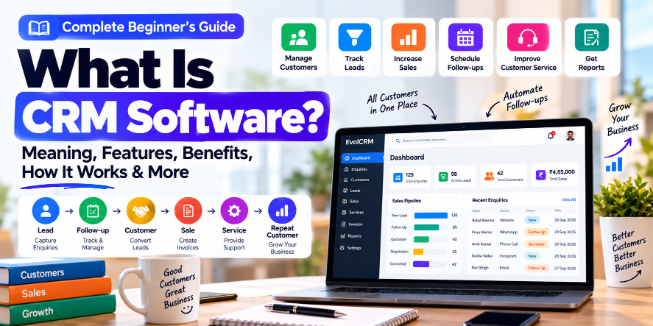
A typical customer journey can look like:
Enquiry → Lead → Follow-up → Customer → Service/Sale → Invoice → Repeat Follow-up
A CRM helps businesses keep track of each stage.
Why Do Small Businesses Need CRM Software?
Small businesses often manage customer information manually. This can create problems such as missed follow-ups, duplicate records, lost enquiries and difficulty tracking sales.
CRM software can help businesses:
- Organize customer information
- Track enquiries and leads
- Schedule follow-ups
- Manage sales opportunities
- Maintain customer history
- Create invoices and documents
- Monitor employee activities
- Generate business reports
- Improve customer communication
The exact benefits depend on the business and its workflow.
How Does CRM Software Work?
A CRM generally follows a simple workflow.
1. Capture the Enquiry
A new enquiry can come from a website, phone call, social media, advertisement or another source.
The information can then be added to the CRM.
2. Create a Lead or Customer
The business can store information such as:
- Name
- Phone number
- Business details
- Requirements
- Lead source
- Notes
3. Follow Up
The CRM can help employees remember when a customer needs to be contacted again.
4. Convert the Lead
When the customer is ready to purchase, the lead can be converted into a customer or sales opportunity.
5. Manage the Customer
After conversion, the business can continue managing services, payments, documents, communication and future follow-ups.
Important CRM Features for Small Businesses
Not every business needs a complicated CRM. The required features depend on the business model.
Customer Management
Store customer information and maintain customer history in one place.
Lead Management
Track enquiries from their initial stage through follow-up and conversion.
Follow-Up Management
Create reminders and tasks so important customer follow-ups are easier to manage.
Sales Management
Track opportunities, sales stages and expected business.
Service Scheduling
Businesses that provide services can use scheduling features to manage appointments and service visits.
Invoicing
A CRM can integrate invoicing or connect customer information with billing workflows.
Reports
Reports can help business owners understand leads, sales, customers, revenue and employee activity.
Mobile Access
Cloud-based or mobile CRM solutions can allow authorized users to access business information from different devices.
CRM Example for a Pest Control Business
Consider a pest control company receiving a new enquiry.
Without a CRM, the process might look like:
Phone call → Notebook → Technician WhatsApp message → Manual follow-up → Invoice
Information can become scattered across different places.
With a CRM, the workflow can become:
Enquiry → Customer → Service Schedule → Technician → Job Card → Invoice → Service Certificate → Follow-up
This creates a more organized workflow.
At EvolCRM, we build customized CRM solutions for business workflows such as customer management, service scheduling, technician management, job cards, invoices, reports and follow-ups.
CRM vs Excel
Excel can be useful for simple lists and basic record keeping. However, as customer activity increases, a CRM can provide features specifically designed for managing customer relationships and business workflows.
Excel may be suitable when:
- You have a small number of records
- Only one or a few people manage the data
- You need basic record keeping
- You don't need automation
A CRM may be more suitable when:
- You have many customers
- Multiple employees need access
- You need follow-up reminders
- You need customer history
- You need automated workflows
- You need detailed reports
- You need mobile access
The right choice depends on the size, workflow and requirements of the business.
How Much Does CRM Software Cost in India?
CRM pricing varies depending on the number of users, features, customization, hosting, integrations and support requirements.
A basic CRM may be available as a low-cost subscription, while a customized CRM built specifically for a business can cost considerably more.
Before choosing a CRM, businesses should consider the total cost, including development, hosting, integrations, maintenance and support.
How to Choose CRM Software for Your Business
Before purchasing or developing a CRM, consider:
- What customer information do you need to manage?
- How many employees will use the system?
- What business processes need automation?
- Do you need Android or mobile access?
- Do you need invoicing?
- Do you need WhatsApp, SMS or email integration?
- What reports do you need?
- Do you require custom features?
- Where will your data be stored?
- What support and maintenance will you need?
A CRM should solve your actual workflow rather than simply provide a large number of features.
Can CRM Software Be Customized?
Yes. Custom CRM software can be designed around a specific business process.
For example, a pest control company may require:
- Customer management
- Enquiry management
- Service scheduling
- Technician assignment
- Job cards
- Contracts
- Invoices
- Customer ledger
- Service certificates
- Sales reports
- Admin dashboard
- Technician mobile app
A generic CRM may not include every workflow, which is why some businesses choose customized CRM development.
Frequently Asked Questions
What is CRM software?
CRM software helps businesses manage customer information, leads, sales, communication, follow-ups and related business activities from a centralized system.
Is CRM useful for small businesses?
Yes. A CRM can help small businesses organize customer information, follow-ups and sales processes as their customer base grows.
Can CRM software be customized?
Yes. Custom CRM software can be designed around the specific workflows and requirements of a business.
Can CRM work on mobile phones?
Many modern CRM systems provide responsive web interfaces or dedicated Android and iOS applications.
Is CRM better than Excel?
It depends on the business. Excel can work well for simple record keeping, while CRM software provides specialized tools for customer management, follow-ups, automation and reporting.
How do I choose a CRM?
Start by identifying your business workflow, required features, number of users, integrations, budget, security requirements and future growth.
Conclusion
CRM software can help small businesses move from scattered customer records and manual follow-ups toward a more organized business workflow.
The most important thing is not choosing the CRM with the most features. It is choosing or building a system that fits the way your business actually operates.
EvolCRM provides custom CRM software development, business automation, web development and mobile app solutions for businesses in India.
If your business has a workflow that is difficult to manage manually, a customized CRM can help turn that workflow into a structured digital system.
Explore EvolCRM:
Related Topics
- What Is CRM Software and How Does It Work?
- How to Automate Lead Follow-Ups
- Pest Control CRM Software: Features and Benefits
- Custom CRM Development in India
- CRM vs Excel for Small Businesses
- How Business Automation Can Save Time