A small business website is more than an online brochure. It can help customers understand your services, contact your business, find your location, request a quote, and take the next step toward becoming a customer.
In 2026, a successful small business website should be mobile-friendly, fast, secure, easy to navigate, optimized for search engines, and designed around customer needs.
If you are planning a new website or improving an existing one, these are 10 important features to consider.
Quick Answer: What Features Should a Small Business Website Have?
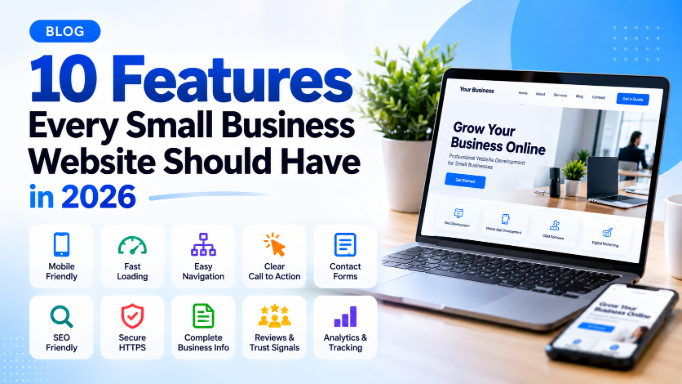
The most important features include:
- Mobile-friendly responsive design
- Fast page speed
- Clear navigation
- Strong calls to action
- Contact and enquiry forms
- Search engine optimization
- Secure HTTPS
- High-quality business information
- Customer reviews and trust signals
- Analytics and performance tracking
The exact features your business needs depend on your industry, customers, services, and goals.
1. Mobile-Friendly Responsive Design
A large portion of website visitors use smartphones. Your website should therefore work properly across phones, tablets, laptops, and desktop computers.
A responsive website automatically adjusts its layout to different screen sizes.
A mobile-friendly website should have:
- Responsive layouts
- Easy-to-read text
- Touch-friendly buttons
- Properly sized images
- Simple mobile navigation
- Forms that work on smartphones
Avoid forcing visitors to zoom or scroll horizontally to use your website.
Why is responsive design important?
A responsive website provides a better user experience and allows customers to access your business information regardless of the device they use.
2. Fast Page Speed
Website speed affects user experience. Visitors may leave when a page takes too long to load.
A small business website should be optimized for performance by reducing unnecessary scripts, compressing images, using efficient code, and choosing suitable hosting.
Ways to improve website speed:
- Compress images
- Use modern image formats where appropriate
- Minimize unnecessary JavaScript
- Reduce unused CSS and JavaScript
- Enable browser caching
- Use a CDN when appropriate
- Optimize server response time
Google also provides performance metrics through Core Web Vitals, which can help website owners understand real-world user experience.
3. Clear and Simple Navigation
Visitors should be able to find important information without searching through complicated menus.
A basic business website navigation might include:
Home → About → Services → Portfolio → Blog → Contact
Depending on your business, you may also need:
- Pricing
- Products
- FAQ
- Case studies
- Locations
- Reviews
Keep navigation simple and use descriptive labels.
4. Clear Calls to Action
A visitor should know what to do next.
A call to action, commonly called a CTA, encourages users to take an action such as:
- Contact us
- Request a quote
- Book a consultation
- Call now
- Get started
- Buy now
- Download
- Schedule a demo
For example:
Need a Website for Your Business? Get a Free Consultation
The CTA should match the purpose of the page instead of appearing randomly throughout the website.
5. Contact and Enquiry Forms
A website should make it easy for potential customers to contact your business.
A simple enquiry form could include:
- Name
- Phone number
- Service required
- Message
For some businesses, you may also add:
- Budget
- Preferred date
- Location
- Number of employees
- Product requirements
Don't ask for unnecessary information. Shorter forms can make it easier for visitors to submit an enquiry.
You can connect forms to email, a CRM, WhatsApp, or other business systems so enquiries can be managed more efficiently.
6. SEO-Friendly Website Structure
Search engine optimization helps search engines understand your website and can improve its ability to appear for relevant searches.
A small business website should have:
- Descriptive page titles
- Useful meta descriptions
- Clear H1 and H2 headings
- Search-friendly URLs
- Descriptive image alt text
- Internal links
- XML sitemap
- Canonical URLs where appropriate
- Crawlable content
- Mobile-friendly pages
For example, instead of:
example.com/page?id=123
a clearer URL could be:
example.com/website-development
However, SEO is not just about adding keywords. The content should genuinely answer the visitor's question and provide useful information.
7. HTTPS and Website Security
Security is essential for modern websites.
Your website should use HTTPS with a valid SSL/TLS certificate.
HTTPS helps protect information transferred between a visitor's browser and your website.
If your website collects:
- Contact information
- Login details
- Payment information
- Enquiries
- Customer data
you should also implement appropriate security controls and data-protection practices.
Regular software updates, secure passwords, backups, access controls, and monitoring are also important.
8. Complete Business Information
Customers should be able to quickly understand who you are and what your business provides.
Your website should clearly communicate:
- Business name
- Services or products
- Service locations
- Phone number
- Email address
- Business address where applicable
- Opening hours where relevant
- About the company
- Contact information
For local businesses, keeping important business information consistent across your website and other online business profiles can also help customers find and trust your business.
9. Reviews, Testimonials and Trust Signals
People often want evidence that a business is trustworthy before contacting or purchasing from it.
Depending on your business, useful trust signals can include:
- Genuine customer reviews
- Testimonials
- Case studies
- Client logos where permission exists
- Certifications
- Awards
- Portfolio examples
- Years of experience
- Secure payment information
- Clear refund or service policies
Use genuine information. Don't create fake testimonials or misleading claims.
For example, a web development company could display completed projects and case studies showing what was built and what problem the project solved.
10. Analytics and Performance Tracking
You should know how visitors are using your website.
Analytics can help answer questions such as:
- How many people visit the website?
- Which pages receive the most traffic?
- Where do visitors come from?
- Which pages generate enquiries?
- Which devices do visitors use?
- Which search queries bring visitors?
- Where do users leave the website?
Tools such as Google Analytics and Google Search Console can provide useful data for understanding website performance and search visibility.
The goal isn't simply to get more traffic. It is to understand whether the website is attracting the right visitors and generating useful business actions.
Bonus Features for Small Business Websites
The 10 features above provide a strong foundation, but some businesses may benefit from additional functionality.
WhatsApp Integration
Businesses that communicate with customers through WhatsApp can add a clear WhatsApp contact option.
Online Booking
Service businesses such as salons, consultants, gyms, clinics, and agencies may benefit from online appointment scheduling.
Online Payments
Ecommerce businesses and service providers can integrate appropriate payment methods.
Live Chat
Live chat can help visitors ask questions before contacting the business.
FAQ Section
An FAQ section can answer common customer questions and make important information easier to find.
CRM Integration
Connecting website enquiries to a CRM can help businesses organize leads, assign follow-ups, and track sales opportunities.
What Is the Most Important Feature of a Small Business Website?
There is no single feature that is most important for every business.
A good small business website should make it easy for visitors to:
Understand the business → find the information they need → trust the business → take the next action.
For one business, that action may be a phone call. For another, it may be a purchase, booking, enquiry, or quotation request.
The website should therefore be designed around the business's actual goals and customer journey.
How Much Does a Small Business Website Cost?
The cost depends on factors such as design complexity, number of pages, functionality, integrations, ecommerce requirements, hosting, maintenance, and custom development.
A simple informational website can require significantly less development work than a custom ecommerce platform or business application.
Before choosing a package, define the features your business actually needs rather than selecting a website based only on the number of pages.
Small Business Website Checklist
Before launching your website, check the following:
- Website works on mobile devices
- Pages load quickly
- Navigation is easy to understand
- Business services are clearly explained
- Contact information is easy to find
- Contact/enquiry form works
- Important pages have unique titles
- Meta descriptions are useful
- Headings are structured logically
- Images are optimized
- Website uses HTTPS
- Important pages are crawlable
- Internal links are implemented
- Sitemap is available
- Genuine reviews or testimonials are displayed where appropriate
- Analytics and Search Console are configured
- Backups and security measures are in place
Frequently Asked Questions
What are the most important features of a small business website?
The most important features generally include responsive design, fast performance, clear navigation, strong calls to action, contact forms, SEO-friendly structure, HTTPS security, complete business information, trust signals, and analytics.
Does a small business need a website?
A website can give a business a dedicated online presence where customers can learn about its products or services, contact the business, and find important information. The value depends on the business's customers and goals.
Should a small business website be mobile-friendly?
Yes. A responsive design allows visitors to use the website comfortably across smartphones, tablets, and computers.
Does website speed affect SEO?
Website performance contributes to user experience, and Google uses page experience signals including Core Web Vitals as part of its ranking systems. However, improving speed alone does not guarantee higher rankings.
What pages should a small business website have?
Common pages include Home, About, Services or Products, Contact, and Privacy Policy. Depending on the business, additional pages may include Portfolio, Pricing, FAQ, Blog, Locations, Case Studies, and Terms.
How can a business website generate more leads?
A website can generate leads by clearly explaining its services, targeting relevant search intent, providing visible contact options, using useful calls to action, offering simple enquiry forms, displaying genuine trust signals, and tracking conversions.
Conclusion
A successful small business website doesn't need every possible feature. It needs the right features for its customers and business goals.
Start with a responsive design, fast performance, clear information, easy contact options, strong security, SEO-friendly content, genuine trust signals, and analytics.
As your business grows, you can add features such as online booking, ecommerce, WhatsApp integration, CRM automation, customer portals, and other custom functionality.
If you are planning a new website, define your business goals and customer journey first. Then choose the technology and features that support those goals.