CRM stands for Customer Relationship Management. CRM software is a system businesses use to organize customer information, manage leads, track sales, schedule follow-ups, and maintain customer relationships in one place. Instead of scattering customer details across spreadsheets, notebooks, email inboxes, and memory, a CRM gives you a single, organized view of every customer and every interaction. This guide explains CRM in simple language, covering what it does, how it works, why businesses use it, what it costs, and how to choose the right system. Whether you run a small business, startup, agency, or freelance operation, this beginner’s guide will help you understand whether CRM software makes sense for you.
What Is CRM Software?
CRM software is a tool that stores and organizes all your customer and prospect information in one central database. It tracks leads, manages follow-ups, records communication history, and helps sales, marketing, and support teams work from the same information. The CRM full form — Customer Relationship Management — describes both the strategy of managing customer relationships and the software that supports it. A CRM system typically stores contact details, enquiry history, sales progress, follow-up dates, notes, and service records. Anyone in your business who interacts with customers can use it: salespeople, support staff, marketers, and business owners. Businesses use CRM because customers expect fast responses, and managing relationships manually becomes impossible as you grow.
A Simple CRM Example for Beginners
Imagine a small business that receives enquiries from multiple channels: a website contact form, WhatsApp messages, phone calls, social media DMs, and email. Without a CRM, these enquiries live in different places. Someone checks the website form, another person answers WhatsApp, and a third handles email. Follow-ups get missed. Customer history is incomplete. Nobody knows who already spoke to whom.
With a CRM, every enquiry goes into one system. Whether someone fills the website form or sends a WhatsApp message, the CRM creates a record. That record shows the customer’s name, contact details, how they found you, what they asked about, and every conversation that followed. When a salesperson follows up, they see the full history. When the customer calls again, anyone in the business can pull up the record and respond knowledgeably.
The CRM workflow looks like this:
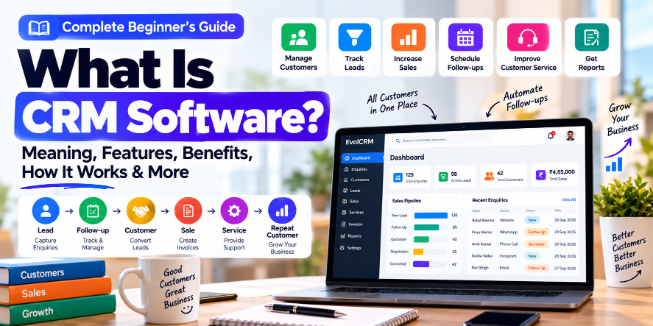
Lead → Follow-up → Customer → Sale → Service → Repeat Customer
Each stage is tracked in the CRM. The lead becomes a contact when they show interest. Follow-ups are scheduled so nothing falls through the cracks. When the sale happens, the record updates. After the sale, service history is added. When the customer returns for something else, everything is already there. This is how CRM turns scattered interactions into organized relationships.
How Does CRM Software Work?
CRM software works by capturing information at every customer touchpoint, storing it in a structured database, and making it available to the people who need it. Here is the basic workflow:
Step 1: Capture Customer Information
When a lead comes in — through a website form, phone call, email, social media message, or in-person visit — the CRM records their details. Some CRMs capture this automatically through integrations. Others require manual entry. The goal is to get the information into the system immediately, before it gets lost.
Step 2: Store Customer Data
The CRM stores contact details, company information, enquiry source, and any notes about the interaction. Unlike a spreadsheet, CRM data is structured. Each field has a purpose. You can search, filter, and segment customers based on any criteria.
Step 3: Track Leads
Not every enquiry becomes a customer. The CRM tracks each lead through stages: new, contacted, qualified, proposal sent, negotiation, won, or lost. This visibility shows where leads are getting stuck and where your sales process needs improvement.
Step 4: Schedule Follow-Ups
Follow-up is where most small businesses lose sales. The CRM helps by creating reminders, tasks, and automated sequences. If a lead needs a call next Tuesday, the CRM puts it on your calendar. If a customer hasn’t heard from you in a week, the CRM flags it.
Step 5: Manage Sales
The CRM shows your sales pipeline: how many deals are in progress, what stage each is at, and the expected value. Sales managers can forecast revenue based on pipeline data. Salespeople know what to work on next.
Step 6: Manage Customer Communication
Every email, call, meeting, and message is logged in the CRM. When a customer contacts you, you see the full history of your relationship. No more asking “Can you remind me what we discussed last time?” The answer is in the system.
Step 7: Track Services and Support
After a sale, the CRM continues tracking. Service requests, support tickets, and follow-up needs are recorded. This helps you maintain the relationship and identify opportunities for repeat business.
Step 8: Analyze Business Performance
CRM reports show which lead sources produce the most customers, which salespeople are performing best, how long deals take to close, and where customers drop off. These insights help you make better decisions about where to invest time and money.
What Information Does a CRM Store?
A CRM stores customer and prospect information that helps you manage relationships. Common data fields include:
- Contact details: Name, phone number, email, company, address
- Lead source: How the customer found you (website, referral, social media, advertisement)
- Enquiry history: What the customer asked about and when
- Communication history: Emails, calls, meetings, messages
- Sales information: Products or services discussed, quotations, deal value
- Follow-up dates: Scheduled calls, meetings, reminders
- Notes: Context about the customer’s needs, preferences, or concerns
- Contracts and documents: Proposals, agreements, invoices
- Payments: Invoices sent, payments received, outstanding amounts
- Support requests: Issues reported and resolution status
- Service history: What was delivered, when, and by whom
The exact fields available depend on the CRM platform and how you configure it. Most CRMs allow you to add custom fields for information specific to your business.
What Are the Main Features of CRM Software?
Contact Management
Contact management is the foundation of any CRM. It stores basic information about every person and company you deal with. Why businesses use it: to find customer details quickly without searching through emails or notebooks. Example: You receive a call from a customer. You type their name into the CRM and immediately see their phone number, email, company, and every past interaction.
Lead Management
Lead management tracks prospects from first contact to conversion. Why businesses use it: to ensure no enquiry is forgotten and to measure which lead sources work best. Example: A website enquiry enters the CRM as a new lead. It gets assigned to a salesperson, who receives a task to follow up within 24 hours.
Sales Pipeline
The sales pipeline is a visual representation of deals at different stages. Why businesses use it: to see how many deals are in progress and forecast revenue. Example: A sales manager opens the pipeline view and sees 15 deals in “proposal sent” stage, worth ₹5,00,000 total. This helps with planning and resource allocation.
Follow-Up Management
Follow-up management schedules reminders and tasks for future customer contact. Why businesses use it: missed follow-ups are the most common reason small businesses lose potential sales. Example: The CRM automatically creates a task to call a customer three days after sending a quotation.
Task Management
Task management assigns and tracks to-dos for individual users. Why businesses use it: to organize daily work and ensure nothing falls through the cracks. Example: A salesperson starts their day by checking the CRM task list, which shows five calls to make and two quotations to send.
Customer Communication
Communication tools log emails, calls, and messages in one place. Why businesses use it: to maintain a complete history of every customer interaction. Example: A customer emails about a problem. The support person opens the CRM, sees the customer’s purchase history and previous support requests, and responds with full context.
Email Management
Email management integrates your email with the CRM. Why businesses use it: to send emails from within the CRM and automatically log them against the customer record. Example: A salesperson sends a proposal email through the CRM. The email is automatically attached to the customer’s record, and the deal stage updates.
Reporting and Analytics
Reports and dashboards show business performance metrics. Why businesses use it: to make decisions based on data rather than guesswork. Example: A monthly report shows that 40% of leads come from referrals but referrals have the highest conversion rate. The business decides to invest more in its referral programme.
Sales Forecasting
Sales forecasting predicts future revenue based on pipeline data. Why businesses use it: to plan cash flow, hiring, and investment. Example: The CRM shows ₹8,00,000 in deals expected to close this month. The business can plan expenses accordingly.
Workflow Automation
Automation performs repetitive tasks automatically. Why businesses use it: to save time and ensure consistency. Example: When a lead fills out a contact form, the CRM automatically sends a welcome email, assigns the lead to a salesperson, and creates a follow-up task.
Customer Support
Support features track customer issues and resolutions. Why businesses use it: to maintain service quality and identify recurring problems. Example: A customer reports a problem. The CRM creates a support ticket, tracks the resolution time, and records the outcome for future reference.
Document Management
Document management stores contracts, proposals, and files against customer records. Why businesses use it: to keep important documents organized and accessible. Example: A salesperson needs to check what was agreed with a customer. The signed contract is stored in the CRM and can be viewed instantly.
Invoice and Payment Integration
Integration with accounting software handles invoicing and payment tracking. Why businesses use it: to connect sales with finance without manual data entry. Example: When a deal is marked “won,” the CRM automatically creates an invoice in the accounting system.
User and Permission Management
Permission settings control who can see and edit what. Why businesses use it: to protect sensitive data and maintain accountability. Example: A salesperson can see their own deals but not the entire company’s revenue figures. A manager can see everything.
Mobile Access
Mobile apps let you access CRM data from anywhere. Why businesses use it: field sales and service teams need customer information outside the office. Example: A salesperson visiting a client can pull up their record on a phone, check recent communications, and log the visit immediately.
What Are the Different Types of CRM?
CRM systems are often categorized in two ways: by their functional focus and by their primary business use.
Types Based on Functional Focus
Operational CRM supports everyday customer-facing processes. It handles sales automation, marketing automation, and service automation. Operational CRM is what most people think of when they hear “CRM” — it helps you manage leads, track deals, and automate follow-ups.
Analytical CRM uses customer and business data for analysis. It helps you understand customer behaviour, segment your audience, and measure marketing effectiveness. Analytical CRM answers questions like “Which customers are most likely to buy again?” or “Which marketing channel produces the best leads?”.
Collaborative CRM enables teams to share customer information. Sales, marketing, and support all access the same customer records. Collaborative CRM ensures that when a customer contacts your business, whoever responds has full context.
Most modern CRM products combine all three types. A single platform handles operational tasks, provides analytical reports, and enables team collaboration.
Types Based on Business Function
Sales CRM focuses on managing leads, deals, and the sales pipeline. It helps sales teams track prospects, schedule follow-ups, and close deals faster.
Marketing CRM focuses on campaigns, customer segmentation, and lead nurturing. It helps marketing teams attract and engage prospects.
Customer Service CRM focuses on support tickets, issue resolution, and customer satisfaction. It helps support teams respond quickly and track service quality.
Again, most CRM platforms include features from all three categories. The categorization helps you understand which capabilities matter most for your business.
Who Uses CRM Software?
Small Businesses
Small businesses use CRM to organize customer information, track leads, and ensure follow-ups happen consistently. A local service business might use CRM to manage enquiries from phone, WhatsApp, and website, assigning each to the right person and tracking until the job is done.
Startups
Startups use CRM to manage early customer relationships, track investor contacts, and build repeatable sales processes. A SaaS startup might use CRM to track trial users, schedule onboarding calls, and identify which features correlate with conversion.
Sales Teams
Sales teams use CRM as their primary work tool. It shows what to work on, who to contact, and how deals are progressing. A sales manager uses CRM reports to coach team members and forecast revenue.
Marketing Agencies
Agencies use CRM to manage client relationships, track campaign performance, and coordinate between account managers and creative teams. An agency might track each client’s campaign history, communication preferences, and billing details in one place.
Service Businesses
Service businesses — plumbers, electricians, consultants, cleaners — use CRM to schedule jobs, track customer history, and manage repeat business. A pest control company might use CRM to record treatment dates, schedule follow-up visits, and send service reminders.
E-commerce Businesses
E-commerce businesses use CRM to track customer purchase history, manage support requests, and run targeted marketing campaigns. An online store might segment customers by purchase frequency and send different offers to first-time buyers versus repeat customers.
Real Estate Businesses
Real estate agents use CRM to track property listings, buyer requirements, and follow-up schedules. An agent might manage hundreds of contacts, each with different property preferences and timelines.
Healthcare Businesses
Clinics and healthcare providers use CRM to manage patient appointments, follow-up reminders, and communication history. A dental clinic might use CRM to send appointment reminders and track treatment plans.
Education Businesses
Coaching centres and educational institutions use CRM to manage student enquiries, admission follow-ups, and fee payments. A training institute might track leads from enquiry to enrolment to completion.
Freelancers
Freelancers use CRM to manage client projects, track invoices, and maintain communication history. A freelance designer might use a simple CRM to track proposals, project deadlines, and payment status.
Why Do Small Businesses Need CRM Software?
Before CRM, small businesses often face these problems:
- Customer information is spread across spreadsheets, notebooks, and email inboxes
- Follow-ups are missed because there is no reminder system
- Enquiries are lost when they come through different channels
- Customer history is incomplete because nobody records every interaction
- Sales tracking relies on memory or manual notes
- Team members cannot see what colleagues have discussed with a customer
CRM addresses these problems by centralizing information, automating follow-ups, and making customer history accessible.
However, not every business needs CRM immediately. A solo freelancer with five clients can manage relationships with a simple spreadsheet or even a notebook. CRM becomes useful when you have enough leads or customers that manual tracking starts causing problems.
Signs you might need CRM: You are missing follow-ups regularly. You cannot remember the last conversation with a customer. Different team members have different information about the same customer. You want to track where leads come from and which sources convert best. Your customer list is growing beyond what a spreadsheet can handle comfortably.
What Are the Benefits of CRM Software?
Centralized customer information means everyone works from the same data. No more conflicting records or lost details.
Better lead management ensures no enquiry is forgotten. Every lead is tracked from first contact to conversion.
Faster follow-ups happen because the system reminds you. You do not need to remember who to call or when.
Improved sales visibility shows exactly where deals stand. Managers and owners can see the pipeline at a glance.
Better customer service results from having full context. When a customer contacts you, you know their history.
Reduced manual work comes from automation. Repetitive tasks like data entry, follow-up scheduling, and report generation happen automatically.
Better team collaboration means sales, marketing, and support share information. A support person can see what sales promised. A salesperson can see what support resolved.
Business reporting shows what is working and what is not. You can measure lead sources, conversion rates, and sales performance.
Improved organization makes customer data searchable and structured. Finding information takes seconds instead of minutes.
Customer retention support comes from consistent communication and service tracking. Customers stay when they feel remembered and valued.
Process automation handles routine tasks so your team can focus on higher-value work.
Limitations to consider: CRM costs money. It requires training. Data migration can be messy. Employee adoption is not guaranteed. Configuration takes time. And some businesses simply do not have enough customer volume to justify the investment.
CRM Software vs Excel or Google Sheets
Spreadsheets are powerful tools. Many businesses start with Excel or Google Sheets for customer tracking. The question is when a spreadsheet stops being sufficient and a CRM becomes worthwhile.
Data organization: Spreadsheets are flat. Everything goes in rows and columns. CRM is relational. Contacts connect to deals, deals connect to activities, activities connect to outcomes.
Automation: Spreadsheets require manual updates. CRM can automatically create tasks, send emails, and update records.
Follow-ups: Spreadsheets rely on you remembering to check them. CRM sends reminders and can automate follow-up sequences.
Sales pipeline: Spreadsheets can track deals with columns for stages. CRM provides visual pipelines, forecasting, and stage-based automation.
User permissions: Spreadsheets are typically all-or-nothing. CRM allows role-based access — salespeople see their deals, managers see everything.
Reporting: Spreadsheets require manual chart creation. CRM generates reports automatically.
Communication history: Spreadsheets can note that a call happened. CRM logs the call, the email, the meeting, and the outcome automatically.
Scalability: Spreadsheets become slow and error-prone as data grows. CRM handles thousands of records without performance issues.
Collaboration: Spreadsheets require version control. CRM is multi-user by design.
When spreadsheets still work: If you have fewer than 100 contacts, simple sales process, no team collaboration needs, and no automation requirements, a well-structured spreadsheet may be sufficient. Spreadsheets are not useless. They are just limited.
CRM vs ERP: What Is the Difference?
CRM manages customer relationships and revenue-related activities. ERP (Enterprise Resource Planning) manages broader business resources and operations.
Purpose: CRM focuses on customers. ERP focuses on operations.
Users: CRM is used by sales, marketing, and support. ERP is used by finance, operations, inventory, and HR.
Data: CRM stores customer data. ERP stores financial data, inventory data, and operational data.
Sales: CRM manages leads, deals, and pipeline. ERP may handle order processing and invoicing.
Finance: CRM may integrate with accounting. ERP includes full accounting and financial management.
Inventory: CRM typically does not manage inventory. ERP tracks stock, purchasing, and supply chain.
Operations: CRM handles customer-facing processes. ERP handles back-office processes.
Business size: CRM suits businesses of all sizes. ERP is typically used by larger businesses with complex operations.
Businesses may use both. CRM manages the customer relationship. ERP manages the resources needed to fulfill what the customer bought. Some platforms combine both.
CRM vs CMS: What Is the Difference?
CRM manages customer and business relationships. CMS (Content Management System) manages website content.
A CRM tracks who your customers are, what they bought, and how you communicate with them. A CMS lets you publish and edit website pages, blog posts, and landing pages.
Example: You write a blog post in your CMS (like WordPress). A visitor reads it and fills out a contact form. That enquiry goes into your CRM. The CMS handles content. The CRM handles the relationship that starts after someone engages with that content.
Cloud CRM vs On-Premise CRM
Cloud CRM is hosted online by the provider. You access it through a web browser. You pay a subscription, usually monthly or annually. The provider manages servers, security, and updates.
On-Premise CRM is installed on your own servers. You buy a license and manage the infrastructure yourself. You have more control over data and customization but also more responsibility for maintenance, security, and upgrades.
Cloud CRM advantages: Faster setup, lower upfront cost, automatic updates, accessible from anywhere, provider handles security.
Cloud CRM limitations: Ongoing subscription cost, data stored on provider’s servers, less customization control.
On-Premise CRM advantages: Full data control, deep customization possible, no ongoing subscription (after license purchase).
On-Premise CRM limitations: Higher upfront cost, requires technical staff, slower setup, you handle security and backups.
For most small businesses, cloud CRM is the practical choice. On-premise makes sense for businesses with specific data residency requirements, existing server infrastructure, or unique customization needs that cloud platforms cannot meet.
What Is CRM Automation?
CRM automation uses software to perform repetitive tasks automatically based on predefined rules. Common automations include:
- Lead assignment: New leads automatically assigned to the right salesperson based on territory, product interest, or round-robin.
- Follow-up reminders: Tasks created automatically when a deal stage changes or a certain time passes.
- Email notifications: Alerts sent when a lead fills a form, a deal is won, or a support ticket is created.
- Lead status changes: Status updates automatically based on activity (e.g., “Contacted” when an email is sent).
- Task creation: Standard tasks created automatically at each sales stage.
- Customer notifications: Automatic emails for order confirmations, appointment reminders, or service follow-ups.
- Sales pipeline updates: Deal stages updated automatically based on customer actions.
- Service reminders: Scheduled maintenance or follow-up notifications sent automatically.
A practical automation workflow:
Website enquiry → CRM entry → Lead assigned to salesperson → Follow-up reminder created → Email sent → Status updated → Deal tracked
Automation should support a well-defined process. If your sales process is inconsistent or unclear, automating it will just make the inconsistency faster. Define the process first, then automate it.
How Is AI Used in CRM Software?
AI in CRM extends automation by adding prediction, analysis, and generation capabilities.
Lead scoring: AI analyzes lead data and assigns a score based on likelihood to convert. Salespeople prioritise high-scoring leads.
Email drafting: AI suggests email content based on customer history and context. The salesperson reviews and edits before sending.
Customer sentiment analysis: AI analyzes communication to detect frustration, satisfaction, or interest.
Sales summaries: AI generates summaries of long email threads, call transcripts, or account histories.
Data analysis: AI identifies patterns and trends in CRM data that might not be obvious.
Follow-up suggestions: AI recommends when and how to follow up based on customer behaviour.
Chatbots: AI-powered chatbots handle routine customer questions and qualify leads before human involvement.
Forecasting: AI predicts which deals are likely to close and when.
Data extraction: AI extracts information from emails, documents, or forms and enters it into CRM fields.
Customer segmentation: AI groups customers by behaviour, value, or other characteristics for targeted marketing.
AI capabilities depend on the specific CRM. Not every CRM has every AI feature. And AI outputs should always be reviewed by humans before acting on them.
Can CRM Software Be Used on Mobile?
Yes. Most modern CRM platforms offer mobile apps for iOS and Android, plus mobile-optimized web access.
Mobile CRM is useful for:
- Field sales: Salespeople visiting clients can access customer history, log visits, and schedule follow-ups immediately.
- Technicians: Service technicians can view job details, customer history, and log completed work.
- Customer information: Anyone can look up contact details, past communications, or deal status from a phone.
- Follow-ups: Notifications remind you of tasks even when away from your desk.
- Service updates: Technicians can update job status, add notes, and trigger customer notifications from the field.
Example: A salesperson is visiting a client. Before the meeting, they open the CRM app, review the client’s recent emails and previous orders, and check the status of pending quotations. After the meeting, they log notes and schedule the next follow-up. All of this happens from the phone, without returning to the office.
How to Implement CRM Software in a Small Business
Step 1: Identify Business Problems
Write down the specific problems CRM will solve. Missed follow-ups? Scattered customer data? No sales visibility? Start with problems, not features.
Step 2: Define CRM Requirements
Based on your problems, list what the CRM needs to do. How many users? What features? What integrations? What budget?
Step 3: Clean Existing Customer Data
Before importing data, clean it. Remove duplicates, update outdated contact details, and standardise formats. Dirty data in equals dirty data out.
Step 4: Choose CRM Software
Evaluate options against your requirements. Use free trials. Involve the people who will actually use the system.
Step 5: Configure the System
Set up pipelines, stages, fields, and user permissions. Configure it to match how your business actually works, not how you wish it worked.
Step 6: Import Customer Data
Import your cleaned data. Test with a small batch first to catch problems.
Step 7: Train Employees
Training is not optional. Show people how to use the CRM for their specific tasks. Address their concerns. Make it clear that using the CRM is part of their job.
Step 8: Create Workflows
Set up automations for repetitive tasks. Define what triggers what. Start simple and add complexity later.
Step 9: Test the System
Use the CRM for real work before fully committing. Find problems. Adjust configuration. Get feedback from users.
Step 10: Measure Results
Track whether the CRM is solving the problems you identified. Are follow-ups happening? Is customer data accessible? Is sales visibility improved?
How to Choose the Right CRM Software
Choosing CRM is about fit, not features. More features do not automatically mean better. Here is a practical checklist:
- Business size: How many users will need access?
- Required features: What functions are essential versus nice-to-have?
- Industry: Does the CRM have features specific to your type of business?
- Ease of use: Can non-technical staff use it without extensive training?
- Mobile access: Do you need mobile apps for field work?
- Automation: What tasks should be automated?
- Integrations: Does it connect with your email, accounting, and other tools?
- Reporting: What reports and dashboards do you need?
- Security: Does it have proper access controls and data protection?
- Data ownership: Can you export your data if you leave?
- Customer support: What support is available when you have problems?
- Pricing: What is the total cost, including setup and training?
- Scalability: Will it grow with your business?
- Customization: Can you adapt it to your specific workflows?
No CRM is perfect for every business. The goal is finding one that fits your needs at a price you can afford.
How Much Does CRM Software Cost?
CRM pricing models vary widely:
Free CRM: Some platforms offer free tiers with basic features. These typically limit users, automation, or reporting. Free CRM can work for very small businesses with simple needs.
Freemium: Free basic version with paid upgrades for advanced features.
Per-user subscription: Most common model. You pay per user per month. Costs increase as your team grows.
Flat monthly pricing: One price regardless of users. Less common but predictable.
Annual plans: Discounted compared to monthly billing.
Custom enterprise pricing: For large deployments with specific requirements.
Self-hosted software: You buy the software and host it yourself. Higher upfront cost, no ongoing subscription.
Custom CRM development: Built specifically for your business. Highest upfront cost but exact fit.
Other costs to consider:
- Setup and configuration: Initial setup time or professional services.
- Data migration: Moving existing data into the new system.
- Customization: Custom fields, workflows, or integrations.
- Training: Time and possibly external training.
- Integrations: Connecting to other software.
- API usage: Some platforms charge for API calls.
- Maintenance: Ongoing support and updates.
Avoid focusing only on the subscription price. The total cost of ownership includes setup, training, and ongoing management.
Is Free CRM Software Enough for a Small Business?
Free CRM can work when: You have few users (1–3). You need basic contact and lead management. Your automation requirements are minimal. You do not need advanced reporting. You are willing to accept usage limits.
Paid CRM may be necessary when: Your team grows beyond a few users. You need automation for follow-ups and workflows. Advanced reporting and forecasting are important. You need integrations with other business tools. Your processes become more complex.
A common pattern: A business starts with free CRM, learns how CRM works, and upgrades when they hit the limits. This is a reasonable approach. The limitation is that free CRM data can decay faster because enrichment features are typically paid. And migrating from free to paid can require cleanup work.
Custom CRM vs Ready-Made CRM
Ready-made CRM is a commercial product used by many businesses. It is available immediately, has documented features, and comes with support. You configure it to fit your needs within what the product allows.
Custom CRM is built specifically for your business. It fits your exact workflows but requires development time and ongoing maintenance.
Setup: Ready-made is usually faster. Custom takes longer because it must be built.
Customization: Ready-made has limited customization. Custom is built exactly to your requirements.
Cost: Ready-made is subscription or license. Custom is a development investment.
Workflow: Ready-made uses predefined workflows you adapt to. Custom is designed around your workflows.
Maintenance: Ready-made is handled by the provider. Custom requires developer or provider support.
Scalability: Ready-made depends on the product roadmap. Custom is designed around your growth plans.
Ready-made suits most small businesses. Custom CRM makes sense when your processes are genuinely unique, existing products cannot meet your needs, or you have specific security or integration requirements that commercial products cannot satisfy.
Common CRM Mistakes Businesses Should Avoid
Choosing too many features. A CRM with every feature is not better if you only use 10% of them. Choose based on what you will actually use.
Poor data quality. Dirty data makes CRM useless. Clean and maintain your data.
No employee training. If people do not know how to use the CRM, they will not use it. Training is essential.
Not defining sales stages. The pipeline only works if stages are clearly defined and consistently used.
Ignoring follow-ups. CRM does not automatically improve follow-ups. Someone has to act on the reminders.
Over-customization. Too much customization makes the CRM complex and hard to maintain. Start simple.
Not measuring CRM usage. If nobody is using it, it is not working. Track adoption.
Buying CRM without identifying the problem. Start with the problem, then find the tool that solves it.
Poor access control. Not everyone needs access to everything. Use permissions appropriately.
Ignoring backups and data security. Your customer data is valuable. Protect it.
Is CRM Software Secure?
CRM security depends on the platform and how you configure it. Important considerations include:
- User authentication: Strong passwords, two-factor authentication.
- Role-based access: Users only see what they need to see.
- Encryption: Data encrypted in transit and at rest.
- Backups: Regular backups to prevent data loss.
- Access permissions: Control who can view, edit, or delete records.
- Audit logs: Record of who did what and when.
- Secure hosting: If cloud-based, the provider’s security practices matter.
- Data retention: Policies for how long data is kept.
- Vendor security practices: Does the provider follow security best practices?
No CRM is automatically secure. Security requires proper configuration and ongoing attention. For cloud CRM, review the provider’s security documentation and compliance certifications.
What Business Metrics Can CRM Track?
- Leads generated: How many new enquiries came in during a period.
- Lead conversion rate: Percentage of leads that became customers.
- Follow-up completion: How many scheduled follow-ups actually happened.
- Sales pipeline value: Total value of deals in progress.
- Win rate: Percentage of deals that close successfully.
- Customer acquisition: Number of new customers gained.
- Sales cycle: Average time from first contact to sale.
- Revenue: Total sales revenue.
- Customer retention: Percentage of customers who stay.
- Repeat purchases: How many customers buy again.
- Service completion: How many support requests were resolved.
These metrics help you understand business performance and identify areas for improvement.
Common CRM Terms Beginners Should Know
Lead: A potential customer who has shown interest.
Prospect: A lead that has been qualified as a potential customer.
Contact: A person in your CRM database.
Customer: Someone who has purchased from you.
Opportunity: A potential sale being tracked.
Deal: A specific sales opportunity with a value.
Pipeline: The stages a deal goes through from lead to close.
Sales stage: A specific step in the sales process.
Conversion: When a lead becomes a customer.
Follow-up: Contacting a lead or customer after an initial interaction.
Activity: A logged interaction (call, email, meeting).
Account: A company or organisation in your CRM.
Contact history: Record of all interactions with a contact.
Customer lifecycle: The stages a customer goes through from first contact to loyal customer.
Automation: Software performing tasks automatically based on rules.
Example: How a Small Business Can Use CRM
A small pest control business receives enquiries through phone calls, WhatsApp, and its website. Without CRM, enquiries are written on paper or remembered. Follow-ups are inconsistent. Customer history is incomplete.
With CRM, every enquiry becomes a record. The workflow:
Enquiry → Lead → Follow-up → Quotation → Deal → Service → Invoice → Payment → Repeat Customer
When someone calls, the CRM creates a lead with their name, phone number, address, and the pest problem they described. A follow-up task is created for the next day. The salesperson calls back, discusses the treatment, and sends a quotation through the CRM. The quotation is logged against the record.
When the customer accepts, the deal is marked “won.” A service appointment is scheduled. The technician receives the job details. After the service, the technician logs what was done and any follow-up needed. The CRM creates an invoice. When payment is received, it is recorded.
Six months later, the customer calls again for a different pest problem. The CRM shows their full history: previous treatment, service dates, payment record, and any notes. The business can offer appropriate service without asking the customer to explain everything again. This is the value of CRM: organized, accessible, complete customer information.
CRM Software for Small Businesses in India
Indian small businesses have specific CRM requirements:
WhatsApp communication: WhatsApp is a primary customer communication channel in India. CRM platforms that integrate with WhatsApp let you manage conversations, send updates, and track follow-ups from within the CRM.
Phone-based enquiries: Many Indian businesses receive enquiries primarily through phone calls. CRM with call logging and mobile access helps track these interactions.
GST invoice support: Indian businesses need GST-compliant invoices. CRM that integrates with accounting software supporting GST is valuable.
Hindi/English customer communication: CRM that supports multiple languages or integrates with translation tools helps serve diverse customers.
Local service businesses: Pest control, cleaning, repair, and other local services benefit from CRM for scheduling, follow-ups, and customer history.
Field technicians: Mobile CRM lets technicians access job details, log work, and update status from the field.
Payment tracking: CRM integrated with payment gateways or UPI tracking helps manage receivables.
Digital documents: Storing quotations, invoices, and agreements digitally reduces paperwork.
Mobile CRM: Most customer interactions happen on mobile. A CRM with a good mobile app is essential.
Exact GST support, payment integrations, and language capabilities depend on the specific software. Verify these features before choosing a CRM for an Indian business.
Advantages and Limitations of CRM Software
Advantages
- Better organization: Customer information is structured and searchable.
- Centralized data: Everyone works from the same information.
- Follow-up visibility: You can see what needs to happen and when.
- Automation: Repetitive tasks happen automatically.
- Reporting: You can measure performance and make data-driven decisions.
- Collaboration: Teams share customer information and work together.
Limitations
- Cost: Subscription or development expense.
- Learning curve: Staff need time to learn the system.
- Data migration: Moving existing data can be time-consuming.
- Employee adoption: Not everyone embraces new systems.
- Configuration: Setup requires thought and effort.
- Dependence on software: Your business processes become tied to the CRM platform.
- Ongoing maintenance: Data needs to be kept clean and current.
Frequently Asked Questions
What does CRM stand for?
CRM stands for Customer Relationship Management. It refers to both the strategy of managing customer relationships and the software that supports it.
What is CRM software?
CRM software is a tool that stores customer information, tracks leads and deals, manages follow-ups, and helps businesses maintain relationships with customers and prospects.
What is the main purpose of CRM?
The main purpose is to organize customer information and interactions in one place so businesses can manage relationships effectively, respond quickly, and never miss follow-ups.
How does CRM work?
CRM captures customer information from various sources, stores it in a central database, tracks interactions, automates follow-ups, and provides reports on sales and customer activity.
Who uses CRM software?
Sales teams, marketing teams, customer support, business owners, freelancers, agencies, service businesses, e-commerce stores, and any business that manages customer relationships.
What are the main features of CRM?
Contact management, lead management, sales pipeline, follow-up scheduling, task management, communication tracking, reporting, automation, and mobile access.
Is CRM useful for small businesses?
CRM is useful when manual tracking becomes difficult due to growing customer numbers, multiple enquiry channels, or team collaboration needs. Very small businesses with few customers may not need CRM yet.
What is the difference between CRM and Excel?
CRM offers automation, structured data, user permissions, reporting, and collaboration that Excel cannot provide. Excel is simpler and free but becomes unwieldy as data grows.
What is the difference between CRM and ERP?
CRM manages customer relationships and sales. ERP manages broader operations including finance, inventory, and HR. They serve different purposes and can work together.
Is CRM software expensive?
CRM pricing varies widely. Free tiers exist. Paid plans typically charge per user per month. Total cost includes subscription, setup, training, and ongoing management.
Is there free CRM software?
Yes. Several CRM platforms offer free tiers with basic features. These work for very small teams with simple needs. Free CRM often has usage limits and fewer features than paid plans.
Can CRM automate follow-ups?
Yes. CRM can automatically create follow-up tasks, send reminder notifications, and trigger email sequences based on rules you define.
Can CRM software use AI?
Many modern CRMs include AI features for lead scoring, email drafting, sentiment analysis, sales summaries, and predictions. AI capabilities vary by platform.
Can CRM be used on mobile?
Yes. Most CRM platforms offer mobile apps for iOS and Android, plus mobile-optimized web access. This is essential for field sales and service teams.
How do I choose CRM software?
Define your problems first. List required features. Consider budget, ease of use, mobile access, integrations, and scalability. Use free trials with the people who will actually use the system.
Is CRM software secure?
CRM security depends on the platform and configuration. Look for user authentication, role-based access, encryption, backups, and audit logs. Review the provider’s security practices.
What data is stored in CRM?
Contact details, lead source, communication history, sales information, follow-up dates, notes, documents, invoices, payments, and support requests.
Can a business build a custom CRM?
Yes. Custom CRM is built specifically for your business. It fits your exact workflows but requires development time, investment, and ongoing maintenance. Ready-made CRM suits most small businesses.
Final Thoughts
CRM software is a tool for organizing customer relationships. It stores information, tracks interactions, automates follow-ups, and provides visibility into sales and service. It is not necessary for every business at every stage. A solo freelancer with a handful of clients can manage with a spreadsheet. But as enquiries increase, channels multiply, and teams grow, manual tracking becomes a liability.
The decision to adopt CRM should start with a problem, not a product. Identify what is not working — missed follow-ups, scattered data, no sales visibility — and determine whether CRM solves it. If it does, choose a system that fits your actual needs, train your team, and use it consistently. CRM is only as valuable as the discipline behind it.